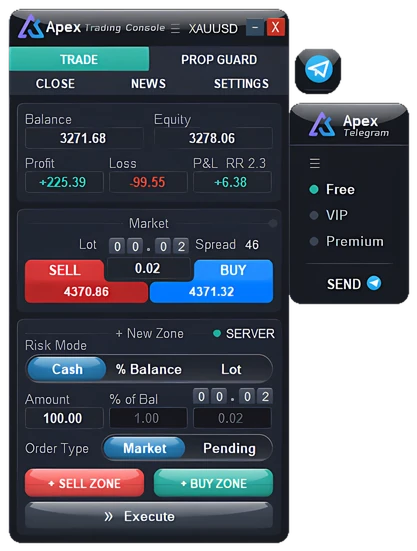
An MT5 trade manager is an add-on that runs inside MetaTrader 5 and owns the mechanical half of a trade. It converts a risk figure into a lot size, sends the order for you, and then carries out the exit plan on its own: banking profit in pieces, lifting the stop to break-even once the trade has earned it, trailing the stop behind price, and dealing with any other orders tied to the same idea.
ApeX Trade Manager is one such tool, shaped as a panel that sits on the chart: you sketch the trade as a box, it does the sizing and the order, then follows the rules you attached to that trade.
Why not just use the stop loss and take profit in MetaTrader?
Because the terminal gives you exactly one of each. One stop, one target, one lot size that you typed in yourself. That is enough for a trade you intend to watch from open to close, and it runs out of room the moment your plan has more than one step in it.
Three things go missing in practice. The lot size stops matching the stop distance, so the same "0.10" means a different amount of money on every setup. Profit becomes all or nothing, because you cannot take part of the position off at one level and let the rest run. And the stop never moves unless you move it, which means the decision to protect a winner lands on you at the least convenient moment.
| The job | MT5 on its ownMetaTrader 5 | With ApeX Trade Manager MT5Expert Advisor for MT5 |
|---|---|---|
| Position size | You type the lot in yourself. | Worked out from the risk you accept and the stop you drew. |
| Take profit | One, held by the broker. | Ten staged levels, each releasing a share of the trade. |
| Stop loss | One, held by the broker. | Ten staged levels on top of the one on the server. |
| Closing part of a trade | By hand, one press at a time. | Happens on its own when price reaches a level you set. |
| Moving the stop to entry | Nothing built in — you drag it yourself. | Five triggers, with spread and commission counted in. |
| Trailing stop | One fixed distance, run by the terminal. | Ten methods, including candles, ATR, RR steps and indicator lines. |
| Linked orders (OCO) | Not available. | Across symbols, up to thirty-two targets a side. |
| Where the levels are held | Always on the broker's server. | Your choice, level by level — server, or inside the EA. |
| Account drawdown limit | Not available. | Live figures, and an automatic stop at a percentage you set. |
What does a trade manager actually handle?
Six jobs, and they are all things a rule can do better than a person under pressure.
- Sizing. You name the amount you are prepared to lose and put the stop where the chart justifies it; the lot size is then arithmetic, not a judgement call.
- Entry. Take the price now, or leave the plan parked on the chart so it triggers only if price comes to you.
- Taking profit in stages. Several targets, each releasing a slice of the position, so a move that only half delivers still pays.
- Protecting a winner. Move the stop up to entry once the trade is far enough ahead, then keep it following price from there.
- Keeping plans from colliding. If two orders express the same idea, the one that fills should retire the other automatically.
- Watching the account, not just the trade. Daily loss and drawdown measured against a ceiling you set, with something that actually happens when the ceiling is approached.
How ApeX Trade Manager MT5 covers each of them
Sketch the trade, and the numbers follow
Entry, stop and target live in a single box you drag around the chart. Move any edge of it and the lot, the money at risk and the reward-to-risk ratio are recalculated while your mouse is still down. Risk can be expressed as a cash amount, as a share of the balance, or pinned to a fixed lot; targets snap to whole ratios from 1:1 through 1:10, and the stop can be positioned off the ATR of whichever timeframe you trust for that market.
Try the arithmetic by hand — free position size calculator →
One press, then the exit plan takes over
Execute sends the trade at market, or leaves it as a pending order at the spot you dropped the box — the trade manager reads which side of price you are on and picks Limit or Stop accordingly. From there the exit is its responsibility: the position can be released in slices, the stop can lift itself to break-even and then follow price on its own, and orders that belong to the same idea can retire each other. How many ways each of those can be set up is counted out below.
A ceiling for the account underneath it all
Prop Guard keeps drawdown, progress toward target and current exposure on screen as live figures, runs eight separate rule watchers, and will close everything or lock the account down at whatever percentage you nominate. The distinction that matters is timing: it is built to intervene while the number is still inside the limit, not to report the breach afterwards. Alongside it, the Close tab clears winners, losers, one direction or the whole book at once, and can be held to a threshold so that only trades past a certain profit are touched.
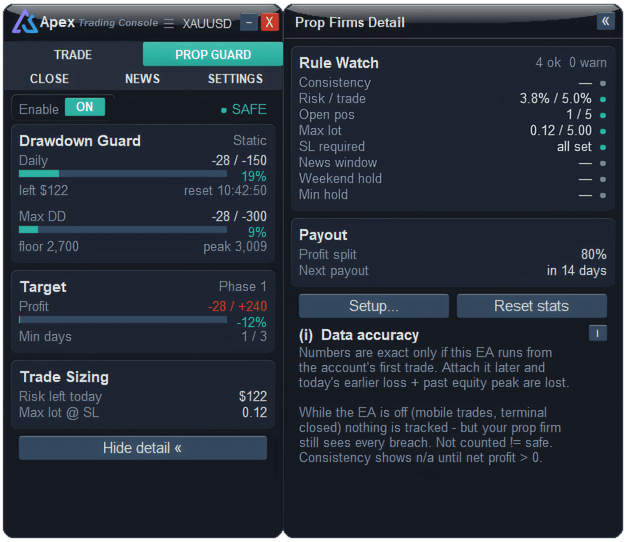
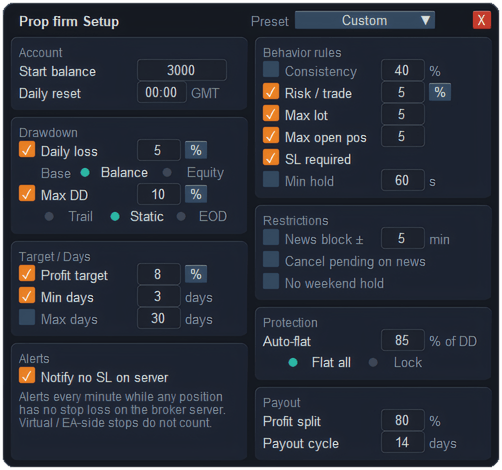
Prop Guard in the manual — every setting → Free prop firm drawdown calculator →
The review is written as you go
Every closed trade is filed with its reward-to-risk, how long it was open, which session it belonged to and which day of the week it fell on. You can pull the list by outcome, by the trades that went out without a stop, or by comment — which is usually how a pattern that costs money becomes visible without anyone keeping a spreadsheet.
How many of each?
Counts first, because that is usually the actual question. Every number below is what the current build ships with.
Trailing stop — ten methods
One method per trade, chosen when you arm it. Each has its own fields: distance, step, when to start, timeframe, offset, ATR period and multiplier, and so on.
- Fixed Distance — holds a set number of points between price and the stop.
- BE + Trailing — goes to break-even first, then starts following.
- Candle Trail — sits at the low or high of the last few candles on a timeframe you pick, with an offset for wicks.
- Trailing + Step — only re-moves the stop once price has cleared a whole step, so the order is modified far less often.
- RR Step — ratchets up a notch for every R gained, staying a chosen number of R behind.
- Volatility (ATR) — the gap is a multiple of ATR, so it opens up when the market moves fast and closes in when it is quiet.
- Indicator — the stop rides an indicator line. Five are available: MA, Parabolic SAR, ATR Stop, ZigZag and Fractals, each on a timeframe you choose.
- Step / Partial-TP — locks the stop at each take-profit level as price passes it, and can release part of the position there.
- Percentage — the gap is a share of price rather than a fixed count of points, so it grows with the instrument.
- Time-Based — time itself is the trigger: once a set stretch has gone by, trailing begins, narrows, or deals with the trade outright. Measure it in minutes or in bars.
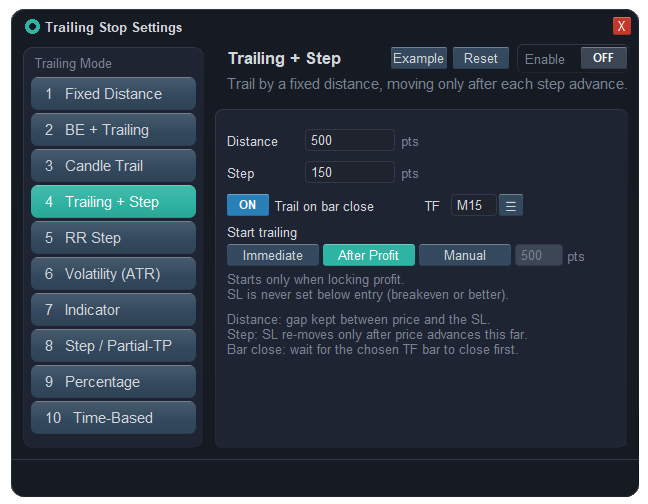
Trailing stop on MT5 in detail — how each method moves and when to start →
Break-even — five triggers
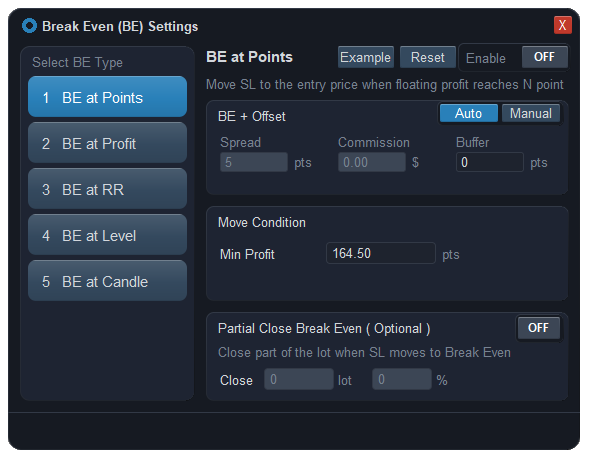
- BE at Points — floating profit reaches a number of points.
- BE at Profit — floating profit reaches an amount of money.
- BE at RR — the open trade's RR reaches a figure you name.
- BE at Level — price arrives at a take-profit level you placed.
- BE at Candle — several candles in a row close past the break-even price on a chosen timeframe, so a wick through it is not enough to trigger the move.
Where the stop actually lands is a separate setting, because the entry price on its own still gives back the trading costs: spread and commission are read from MetaTrader and converted for you, or typed in by hand, plus any buffer you want on top. Break-even can also release part of the position in the same instant the stop moves, which puts something in the bank and leaves the remainder with nothing left to lose.
Break-even on MT5 in detail — the real break-even price and when each trigger fires →
Partial take profit and partial stop loss — ten levels each
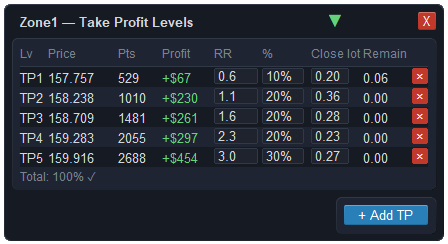
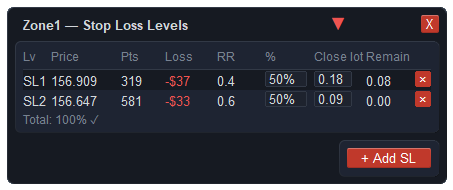
A trade can carry up to ten take-profit levels and up to ten stop-loss levels at the same time. Each level is a draggable line on the chart with its own row in a table: price, distance in points, what it banks or costs, the RR it reaches, and the share it closes — written either as a percentage or as a lot, whichever you prefer to think in. Both sides eat into one pool of volume, so what is left over is measured against the real remainder of the position, and once a level has fired it is locked, so nothing behind it gets quietly resized.
OCO (One-Cancels-the-Other) — across symbols, up to thirty-two targets a side
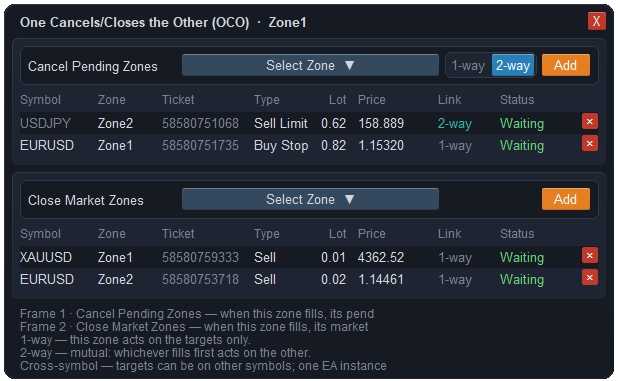
One-Cancels-the-Other means exactly what the name says: two or more orders are tied together, and the moment one of them does its job, the rest are taken off the board.
A trade can be pointed at two lists: pending orders to cancel, and open positions to close. When it fires, everything on those lists goes. Targets need not belong to the symbol in front of you — the single EA instance tracks every one of them by ticket, so a link outlives renumbering and keeps working while you are away on another market entirely.
A pending order links one way — it clears its target while the target has no hold over it — or both ways, where the first to fill takes the other out. An order that is already open links one way only, but you decide whether the trigger is its take profit or its stop loss, so the rest of the basket goes only on a win, or only on a loss. A link is spent after it acts once, and a virtual pending order joins in on the same terms as a real one.
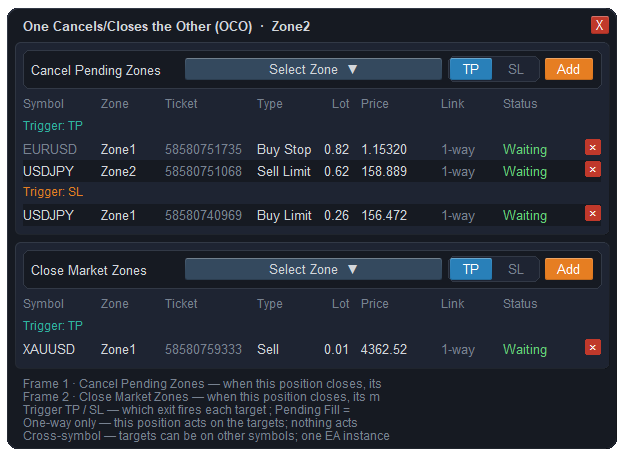
OCO on MT5 in detail — straddles, win-only or loss-only clean-ups, and links across symbols →
Virtual levels — kept inside the EA
Entry, stop, target, break-even and trailing can each be switched to a virtual level, one by one. A virtual level is held by the EA and is not sent to the broker's server; the EA watches price and acts when it arrives. A virtual entry places nothing at all until the price is reached, and how far past that price a fill is still accepted can be capped — off, a figure times ATR, a flat count of points, or a figure times whatever the spread happens to be.
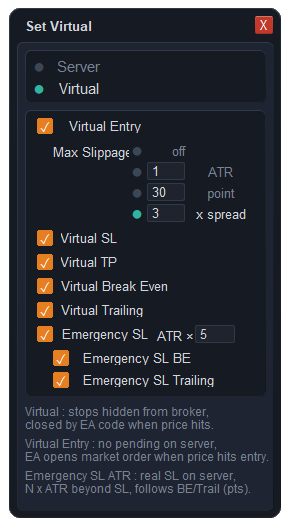
This is worth understanding before you use it. An emergency stop can be left on the server as a real one, sitting a multiple of ATR behind the virtual stop, and it can follow break-even and trailing moves so the gap stays the same. It is a checkbox, and you can clear it — but with it off, nothing is held on the server at all, so if MetaTrader closes, the machine sleeps or the connection drops, the trade has no stop until the terminal is back. That is the trade being made, and it is the reason the emergency stop exists.
Virtual stop loss on MT5, and what you give up for it →
Plans on file — up to a hundred
Each planned or open trade occupies a numbered slot, and a hundred of them can exist at once. They are not all drawn at the same time: the chart shows a page of them and you move between pages, which is what keeps a hundred plans from turning into a chart nobody can read. A slot keeps its settings — levels, break-even, trailing, OCO links — for as long as the trade it belongs to exists.
Works on every symbol your MT5 broker offers
The lot size comes from MetaTrader 5's own profit calculation for the symbol on your chart, so it uses your broker's contract size, tick value and the conversion into your account currency. There is no table of fixed pip values inside, which is why gold, an index and a yen pair all come out right on the same trade manager.
- FXForex
- AUGold & metals
- IDXIndices
- OILCommodities
- ₿Crypto CFDs
- STKStock CFDs
One condition: the account must be a hedging account, which is the usual setup at CFD brokers. Netting and exchange accounts are not supported, and on one of those the trade manager says so and will not open trades.
What else is in there, besides managing the trade
Two of them answer a question you would otherwise leave the platform to answer. A performance table ranks the twenty-eight major currency pairs by how far they have moved, across seven timeframes at once, with a combined score to sort by. A strength meter turns the same pairs into a reading per currency, so you can see which side of a pair is doing the work before you commit to it. Double-click a row and the chart follows.
Being told when something happens
Three places a warning can reach you, and you decide which events use which: a card that slides onto the chart with a sound, a push to the MetaTrader 5 app on your phone, and a message in Telegram.
What makes them speak is the more interesting half. Your own drawings can call you the moment price arrives at them — a trend line, a horizontal line or a rectangle zone all qualify. A candle can speak up ahead of its own close, as many minutes early as you nominate, on anything from M1 to monthly. And an economic release can warn you before it lands, with its own lead time for each level of importance, so high-impact news can reach you thirty minutes out while the low-impact ones stay quiet until they are nearly here — or stay quiet altogether.
Around all of that sit the ordinary conveniences of a trading day: an economic calendar, screenshots, hotkeys, themes and a market watch. None of it is a separate purchase — it is the same trade manager.
MT5 and Telegram in detail — alerts, signals to your channels, and control from your phone →
What it will not do for you
Worth reading before you install anything, not after.
- It has no opinion on the market. No signals, no suggested entries, no forecast, no claim about profit. Choosing the trade remains entirely your job; the trade manager only executes and manages what you decided.
- The terminal has to be running. Staged levels, break-even moves, trailing stops, OCO links and the watch-list closures are all performed by the EA itself, which means they pause whenever MetaTrader is shut down. A plain stop loss and take profit are held by the broker and are unaffected either way.
- Hedging accounts only. On a netting account the trade manager tells you so rather than behaving unpredictably.
- It is one product, not a shelf of them. Trade manager, trading panel, risk manager and position size calculator are four descriptions of the same trade manager, not four things to buy.
Questions
What is an MT5 trade manager?
It is an add-on for MetaTrader 5 that turns a risk figure into a lot size, places the order, and then executes the exit plan by itself — partial profit taking, break-even, trailing stops and linked orders — so a trade follows a rule instead of depending on you being at the screen.
How many trailing stop modes does it have?
Ten, and you pick one per trade: Fixed Distance, BE + Trailing, Candle Trail, Trailing + Step, RR Step, Volatility (ATR), Indicator, Step / Partial-TP, Percentage and Time-Based. The Indicator method has five lines of its own to choose from — MA, Parabolic SAR, ATR Stop, ZigZag and Fractals.
How many break-even types does it have?
Five: BE at Points, BE at Profit, BE at RR, BE at Level and BE at Candle. Where the stop lands is set separately, with spread and commission read from MetaTrader and converted into points, plus a buffer of your own — and part of the position can be closed at the same moment the stop moves.
Does it do partial take profit and partial stop loss?
Yes — up to ten take-profit levels and up to ten stop-loss levels on the same trade. Each one is a draggable line on the chart that releases a share of the position, entered as a percentage or as a lot. The two sides share a single pool of volume, so the figure left over reflects the real remainder rather than the original size.
Can it run OCO (One-Cancels-the-Other) orders across different symbols?
Yes. One trade can point at up to thirty-two pending orders to cancel and thirty-two open positions to close, and those targets may sit on any symbol — the EA tracks them by ticket, so the chart they belong to can stay closed. A pending order links one way or both ways; an open position links one way, with the trigger set to its take profit or its stop loss.
What are virtual stop levels?
Levels the EA holds itself instead of sending them to the broker's server — entry, stop, target, break-even and trailing can each be switched over one at a time, and the EA acts when price arrives. An emergency stop can still be left on the server a set distance behind, and it can follow break-even and trailing moves. If you turn that off, nothing is held on the server, so a closed terminal or a dropped connection leaves the trade with no stop until it is back.
What alerts and notifications does it have?
A warning can reach you in three places, each switched on separately: a card on the chart with a sound, a push to the MetaTrader 5 app on your phone, and a message in Telegram. Three things can set one off. Anything you drew yourself calls you when price touches it, trend lines, horizontal lines and rectangle zones alike. A candle warns you before it closes, by however many minutes you name, on anything from M1 to monthly. And an economic release warns you before it lands, with a separate lead time for high, medium and low importance, so the heavy news can reach you well ahead while the rest stays quiet.
Is a trade manager an indicator or an Expert Advisor?
An Expert Advisor, because it has to be able to send and modify orders — something an indicator cannot do. You attach it to a chart and switch on algorithmic trading, and the panel appears there.
Does it open trades on its own?
Not on its own. Nothing is opened until you plan a trade and press Execute, and what runs unattended afterwards is only the management you attached to that trade — the staged exits, break-even, trailing and OCO. The one exception is auto trading, which you switch on yourself with ApeX Indicator SMC or ICT Concepts: by default it only drafts each signal for you to execute, and it places orders itself only if you choose the Pending or Market mode.
Do I have to leave MetaTrader open?
For anything the EA performs, yes — staged levels, break-even moves, trailing stops, OCO links and watch-list closures are idle while the terminal is shut. An ordinary stop loss and take profit are held on the broker's server and continue to work regardless.
Does it work with ApeX Journal?
Yes. ApeX Journal is a trading journal sold separately, and each works on its own. Run both on the same MetaTrader 5 and the Journal picks up what only the trade manager knows: you choose the setup, tick its checklist and capture the chart on the Journal's Trade Card before you enter, and every stop and target move, break-even, trailing mode and partial close is kept with the trade, along with plan against actual. That history exists only for trades taken while both were running, and each product has its own licence key.
Does it work with ApeX Indicators?
Yes. The ApeX indicators are sold separately and each works on its own as an analysis tool. With ApeX Indicator SMC or ICT Concepts on the same chart, the trade manager can trade their signals automatically and manage those trades by its own rules. Any ApeX indicator can also dock its bar onto the panel with the Combine switch, and while it does, the free ICT Macros indicator sends its macro alerts through the trade manager's notifications — chart card, sound, phone push and Telegram — instead of MetaTrader's alert window. How the tools work together →
Can a trade manager help on a funded or prop firm account?
That is what the Prop Guard side is for: daily loss, maximum drawdown, targets and trading days are tracked live, and the account can be flattened or locked at a percentage you set before a limit is reached. It enforces the numbers you enter, so check them against your own firm's rulebook — it has no knowledge of their terms.
Which markets and account types does it support?
Any symbol your broker lists: forex, gold and metals, indices, commodities, crypto CFDs and stock CFDs. Lot size comes from MetaTrader 5's own profit calculation, so each symbol's contract size, tick value and account-currency conversion are used as your broker defines them. The requirement is on the account type rather than the market: it must be a hedging account, as netting and exchange accounts are not supported.
See it on your own chart first
The demo edition runs on a demo account, which is enough to plan a trade, execute it and watch the management behave before any money is involved.
Read the MT5 Trade Manager user manual — every feature, step by step →