




Professional MT5 Trade Manager & Risk Management Tools

Build a better trading workflow.

ApeX builds focused MetaTrader 5 tools for trade management, risk control, journaling and market analysis — designed to work together without getting in your way.

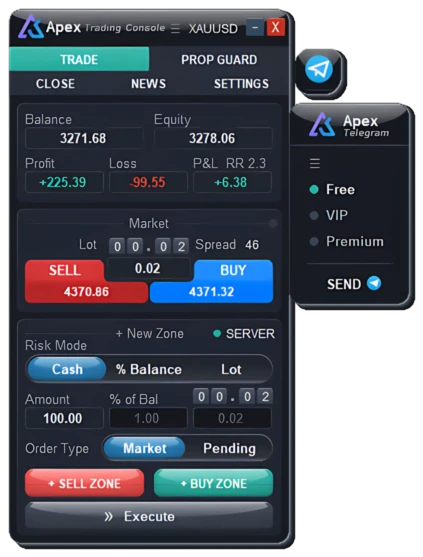
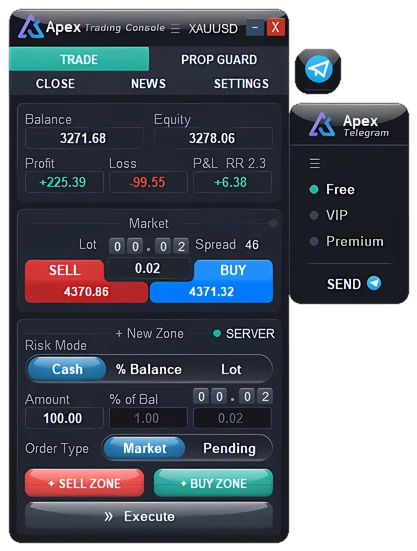
ApeX Trade Manager MT5 panel
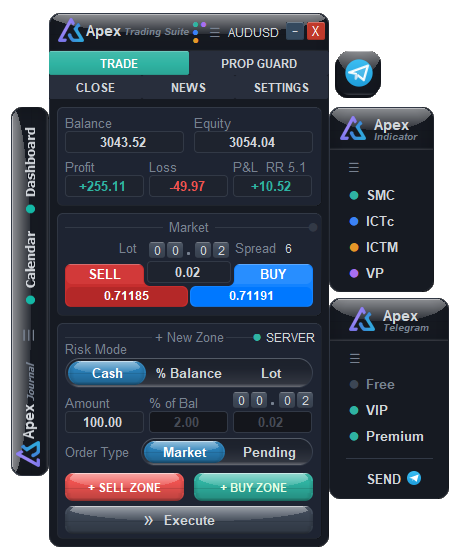
ApeX Trade Manager MT5 — ApeX Trade Manager panel for MetaTrader 5 ApeX Trading Suite MT5 — ApeX Trade Manager combined with ApeX Indicator and ApeX Journal
Made for MT5
  • ApeX Trade Manager MT5
  • Works on its own · add-ons optional
  • ApeX Journal MT5
  • ApeX SMC indicator MT5
  • ApeX ICT Concepts indicator MT5
  • ApeX Volume Profile indicator MT5
  • ApeX ICT Macros indicator MT5
Flagship product

ApeX Trade Manager MT5Plan, size and manage every trade on the chart

Plan → Size → Execute → Manage

One Trade Manager for every trade — from the zone you draw on the chart to the final close, with risk limits watching every step.

  • Trade manager
  • Trading panel
  • Risk manager · Prop guard
  • Position size calculator
Add-ons · sold separately

ApeX Trading SuiteTrade Manager + Indicator + Journal

Analyze → Alert → Trade → Review

Dock ApeX Indicator and ApeX Journal onto the Trade Manager and it becomes one connected trading suite on MetaTrader 5.

  • SMC · ICT · Volume Profile on one bar
  • Auto trade from SMC & ICT
  • Alerts as ApeX notifications
  • Journal · calendar, dashboard & reports
Download the free demo Free demo · No credit card
Telegram tools built in MT5 desktop · Hedging accounts

See it work on a real chart.

Six short scenes recorded in MetaTrader 5 — pick one to jump straight to it.

1

Add ApeX Trade Manager MT5

Attach ApeX Trade Manager to your MT5 chart.

2

Zone paging & filter

Browse and filter Market Zones or Pending Zones.

3

Market order zone

Set up a Market Order directly from the zone.

4

Pending order zone

Set up a Pending Order with the zone.

5

Free chart movement

Move freely around the chart while keeping the ApeX Trade Manager interface available for trade management.

6

Close orders

Close Market Orders and cancel Pending Orders directly from the trade manager.

What the trade manager actually does.

Three stages of every trade — plan it, let it run, keep the account safe.

01Plan & size

Plan it on the chart

Drag entry, stop and target as one box on the chart. Lot size, money at risk and reward-to-risk update while the mouse is still down — and up to a hundred plans wait on file, a page at a time, so the chart stays clean.

  • Entry · SL · TP in one box
  • Risk as cash, % or fixed lot
  • Live lot & RR
  • 100 trade zones
02Manage

Exits that run without you

Take profit in stages, move the stop to break-even with spread and commission counted, and trail it the way your system does — without sitting in front of the screen. OCO links orders so the one that fills retires the rest, even on other symbols whose charts aren't open.

  • 10 partial TP levels
  • 10 partial SL levels
  • 5 break-even triggers
  • 10 trailing methods
  • OCO (One-Cancels-the-Other) across symbols
03Protect

A ceiling under the account

Prop Guard shows daily loss, drawdown and exposure as live figures and can flatten or lock the account at a percentage you set — while the number is still inside the limit, not after it breaks. Stops and targets can also be held by the EA as virtual levels, with an emergency stop left on the server as a backup; switch that off and nothing sits on the server while MetaTrader is closed.

  • Daily loss limit
  • Drawdown limit
  • Live exposure
  • Auto flatten or lock
  • Virtual SL · TP · BE · trailing
  • Emergency SL

Trade management

Trade management: MT5 on its own compared with ApeX Trade Manager
The job MT5 on its ownMetaTrader 5 With ApeX Trade Manager MT5Expert Advisor for MT5
Lot size Typed in by hand From the risk you accept
Exit points One stop, one target Ten of each, in stages
Break-even Move the stop by hand Five triggers, spread and commission counted
Trailing stop One fixed distance Ten methods
Linked orders Not available OCO, across symbols
Closing trades Bulk close by hand Filter by symbol, magic or comment — or close automatically at a floating P/L you set
Drawdown limit Not available Stops the account itself

Alerts & tools

Alerts and tools: MT5 on its own compared with ApeX Trade Manager
The job MT5 on its ownMetaTrader 5 With ApeX Trade Manager MT5Expert Advisor for MT5
Alerts to your phone MT5 app push only MT5 app and Telegram
What can trigger an alert A price level Candle close · trendline · zone · pending fill · SL · TP · break-even · trailing
News Check the calendar tab yourself Warns you before the release
Hotkeys Terminal shortcuts, none for managing trades Your own keys for trade actions
Moving the chart Stops at the chart edge, even with fixed scale Drag past the edge, with room to draw
Currency strength Not available Performance and strength tables
Screenshots One chart, as it looks One timeframe or several at once, UI hidden
Market sessions Not available Tokyo · London · New York on the chart

Also in the trade manager: Telegram tools and several themes. How an MT5 trade manager handles each of these →

What a complete trading process is made of

Great trading is more than finding an entry.

Some parts no tool can do for you. Mindset is yours, ApeX builds the rest. Switch a part off and see what goes missing.

Trader score 93 / 100 You alone: 50 26Mindset 25Money 17Analysis 15Discipline 10Edge +43 with ApeX
ApeX Trade Manager
ApeX Indicator SMCApeX Indicator ICT ConceptsApeX Indicator Volume Profile
ApeX Trade ManagerApeX Journal
ApeX Journal
You aloneYou + ApeX
Build yours

AI Coach is part of Journal. Optional, uses your own AI key.

  • Mindset 30%Patience and emotional control are yours alone, but they grow with practice. Psychology notes in Journal show which emotions cost you money, and the optional AI Coach picks the one habit costing you most, then checks next round whether you fixed it. Score: you 18 + psychology notes 2 + AI Coach 6 = 26 of 30. The last 4 is yours alone. You + AI Coach
  • Money management 25%Size every trade from the risk you accept, then let partial exits, break-even and trailing manage it. ApeX Trade Manager
  • Analysis: bias & setups 20%Read the bias first, then find a clear reason to enter: structure, order blocks, fair value gaps and where volume sits, drawn on your chart. No indicator is right every time. It shows structure and odds, not certainty, so this axis never reaches full marks. ApeX Indicator SMC · ICT Concepts · Volume Profile
  • Discipline 15%Follow your plan when emotions push you not to. Prop Guard in Trade Manager enforces your loss limits and blocks the revenge trade. Pair it with Journal and a pre-trade checklist makes you pause before you click. ApeX Trade Manager + ApeX Journal
  • Edge tracking 10%Statistics and trade review show what actually pays, and what doesn't. ApeX Journal
Get your real score from your own trades: ApeX Journal →

Illustration of our framework, not a statistic or a promise. Full marks mean the tool covers its part. Using it well is still on you.

The tools cost less than the mistakes.

One bad trade can cost more than the tools that help you keep it under control.

The ApeX ecosystem.

A growing toolkit for traders who want execution, analysis and review to live closer together inside MetaTrader 5.

Flagship ApeX Trade Manager — MT5 trade manager and risk management panel for MetaTrader 5
Trade management

ApeX Trade Manager MT5

Plan, size, execute and manage trades with visual entry, SL/TP levels, risk controls, partial exits, break-even, trailing, OCO and Telegram tools.

Plan → Size → Execute → Manage
  • 10 trailing modes
  • Partial TP & SL ×10
  • OCO across symbols
  • Prop Guard
What an MT5 trade manager does →
AI Coach ApeX Journal MT5
Trading journal

ApeX Journal MT5

Turn your MT5 history into a structured journal with statistics, trade review, screenshots, setups, psychology notes and optional AI analysis.

Journals on its own · trade setups & pre-trade checklist need Trade Manager
What an MT5 trading journal does →
+ Trade Manager = Auto trade ApeX Indicator SMC MT5
Market analysis

ApeX Indicator SMC MT5

Market structure, BOS and CHoCH, order blocks, fair value gaps, liquidity and premium/discount zones, drawn directly on your MT5 chart, plus a multi-timeframe market structure table with alerts.

Analysis works on its own · auto trade needs Trade Manager
What SMC does →
+ Trade Manager = Auto trade ApeX Indicator ICT Concepts MT5
Market analysis

ApeX Indicator ICT Concepts MT5

An ICT toolkit for MetaTrader 5 with practical chart-based concepts, designed to keep the analysis visible without burying the chart.

Analysis works on its own · auto trade needs Trade Manager
What ICT Concepts does →
ApeX Indicator Volume Profile MT5
Market analysis

ApeX Indicator Volume Profile MT5

See how volume is distributed around market pivots and study the Point of Control and profile shape directly on your MT5 chart.

Free with Trade Manager · standalone version on MQL5
What Volume Profile does →
ApeX Indicator ICT Macros MT5
Market analysis

ApeX Indicator ICT Macros MT5

Free MT5 indicator that marks the 8 ICT macro windows (London and New York) with top, mid and bottom lines, labels each one, and alerts you before the next starts.

Works standalone · pairs with Trade Manager
What ICT Macros does →

Where to buy

Every ApeX tool is sold by us, under one name, in two places.

Where to buy each ApeX product: MQL5 Market or the ApeX Store
Product MQL5 Market@apexaltus ApeX Store Official websiteapexaltus.com
ApeX Trade Manager MT5 10 activations1 activation = 1 computer Up to 10 active accountsAdd or remove accounts yourself, anytimeFree trial
ApeX Journal MT5 10 activations1 activation = 1 computer Up to 10 active accountsAdd or remove accounts yourself, anytimeFree trial
ApeX Indicator SMC MT5 10 activations1 activation = 1 computer Up to 10 active accountsAdd or remove accounts yourself, anytimeFree trial
ApeX Indicator ICT Concepts MT5 10 activations1 activation = 1 computer Up to 10 active accountsAdd or remove accounts yourself, anytimeFree trial
ApeX Indicator Volume Profile MT5 10 activations1 activation = 1 computer FreeWorks with ApeX Trade Manager on the same chartDownload
ApeX Indicator ICT Macros MT5 Free FreeDownload
MQL5 activations
  • Each activation is tied to one computer
  • A new computer or VPS uses up another activation, for good
ApeX Store accounts
  • One key works on up to 10 live accounts in your name, on any computer
  • Remove an account and add a new one yourself, anytime
  • Demo accounts don't count toward the limit

You already pay to trade.

Every order comes with a cost — spread, commission, swap and slippage — paid to your broker and the market, win or lose. Add it up over a year and the number is usually bigger than you think.

ApeX doesn't change those costs. It just shouldn't become another big one.

But the cost bigger than any spread…

Going in circles?

The same setup. The same mistake. The same result. ApeX Journal turns every trade into data, so you can see what keeps repeating and fix it. And its AI Coach helps you analyze your mistakes and shows you what to fix.

Your last trade…

  • Did you know how much you could lose before you entered?
  • Did you add to it while it was losing?
  • Can you still say why you took it?

If any of these is hard to answer, watch this trade

Flagship product

Trade with a plan.
Manage it in one place.

ApeX Trade Manager is an MT5 trade manager that works right on the chart. Draw the trade, set the risk you accept, execute it, then let the trade manager follow the management rules you chose.

Risk-based sizing
Cash · % of balance · fixed lot
Visual trade planning
Entry · SL · TP · RR
Trade management
Partial TP · break-even · trailing · OCO
Account protection
Drawdown limits · prop firm guard
Works on every symbol your MT5 broker offers
  • FXForex
  • AUGold & metals
  • IDXIndices
  • OILCommodities
  • ₿Crypto CFDs
  • STKStock CFDs
Lot size from MT5's own calculation with your broker's symbol specs · hedging accounts · details
ApeX Trade Manager MT5 panel — risk-based lot sizing, buy/sell zones and trade management

ApeX Trade Manager MT5

Professional MT5 trade manager
ApeX Pro

Choose the plan that fits your workflow.

Monthly, yearly and lifetime licences for ApeX Trade Manager — bought and managed on our own shop.

Learn the workflow.

Documentation and practical guides, so you understand ApeX before you put it on a live chart.

Start here

User Manual

Four short steps from install to your first closed trade, then every guide by task — plus what each message on screen means.

Get started

Downloads

Installer files for MetaTrader 5, the version history and what changed in each release.

Guide

MT5 trade manager

What this kind of tool handles, why one stop and one target run out of room, and where ApeX draws the line.

Guide

Virtual stop loss

What changes when the stop is held by the EA instead of the broker, what it costs you, and what it does not protect you from.

Guide

Break-even on MT5

Why the entry price is not really break-even, the five ways to trigger the move, and what it cannot protect you from.

Guide

Trailing stop on MT5

Ten ways to trail a stop beyond a fixed distance, how each one moves, and when to start trailing at all.

Guide

OCO (One-Cancels-the-Other)

Linking orders so one filling cancels the rest — straddles, win-only or loss-only clean-ups, and links across symbols.

Guide

Close all trades on MT5

What Bulk Operations can and cannot do, closing a filtered group in one press, and taking a basket off at a profit target.

Guide

Hotkeys for MT5

Binding your own keys to trade actions, the combinations Windows and MetaTrader take first, and what a key does without asking.

Guide

Multi-timeframe screenshots

Every timeframe of one chart in a single press — how the chart steps through them, how each picture is framed, and where the files go.

Guide

MT5 and Telegram

Alerts to your own chat, signals to the channels you run, and commands from your phone — and what never leaves your chat.

Help

Activating your licence

Where the key goes, what each status means, and how to fix every licence message — including a full account limit.