A trailing stop is a stop loss that follows price in your favour and never moves back. MetaTrader 5 includes one: right-click a position, pick a distance in points, and the terminal keeps the stop that far behind the best price reached. It is one fixed distance, it only starts once the trade is that far in profit, and it runs inside the terminal, so it stops following when MetaTrader is closed.
Other ways of trailing measure the distance against something that changes with the market — recent candles, volatility, an indicator line, the risk you took, your take-profit levels, or the time the trade has been open.
MT5's own trailing stop, and where it runs out
| MetaTrader 5 alone | With ApeX | |
|---|---|---|
| Distance measured by | Points only. | Points, % of price, ATR, candles, indicators, R, TP levels or time. |
| When it starts | When profit reaches the distance. | Straight away, after a profit you set, or only once it can lock profit. |
| How often the order is changed | Each time price improves. | Optionally only after a minimum step. |
| Needs the terminal running | Yes. | Yes — the EA does the moving. |
The last row is the same on both sides, and it is worth being clear about: any trailing stop, built in or not, is moved by software on your machine. With an ordinary stop, the last position it reached stays on the broker's server while the terminal is off; it simply stops advancing.
Ten ways to trail a stop
Each trade uses one method. They fall into four families by what the distance is measured against.
By distance
- Fixed Distance — a set number of points behind price. The closest match to MetaTrader's own, with the start options below added.
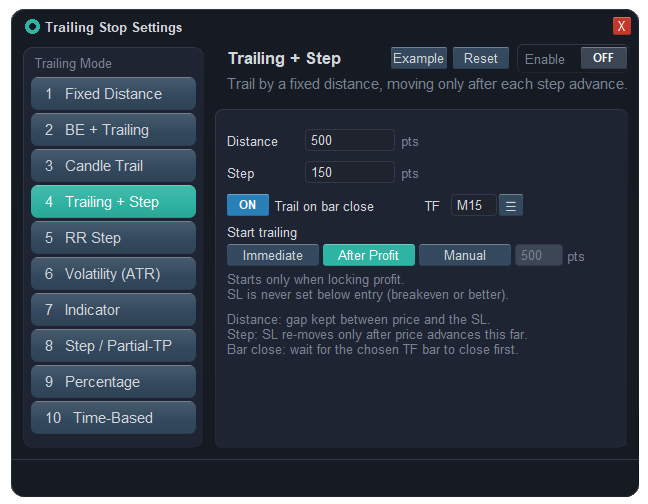
- Trailing + Step — the same distance, but the stop only moves again once it can improve by a whole step, so the order is modified far less. It can also follow the close of the last finished candle on a timeframe you pick instead of the live price.
- Percentage — the distance is set as a share of the current price, so it scales with the instrument rather than being a fixed count of points.
- Volatility (ATR) — the gap is ATR times a multiplier, on the period and timeframe you choose. When the market calms down the stop draws in; when it speeds up the stop does not loosen, because a trailing stop never moves backwards.
By chart structure
- Candle Trail — the stop sits below the lowest low of the last few finished candles for a buy, or above the highest high for a sell, on the timeframe you choose, with an offset so it is not right on the wick.
- Indicator — the stop is pinned to an indicator line, plus an offset: a moving average (simple, exponential, smoothed or linear-weighted), Parabolic SAR, an ATR stop based on the highest high or lowest low, the latest ZigZag pivot, or the latest confirmed fractal.
By profit reached
- BE + Trailing — moves to break-even first, using the same spread, commission and buffer offsets, and only then starts following at its own distance.
- RR Step — counts profit in R, where 1R is the distance from entry to your first stop. Every time the trade gains another step of R, the stop climbs to that level minus the lag you set; it never goes below a break-even that covers costs.
- Step / Partial-TP — works with your take-profit levels. Each time a level is hit and closes its share, the stop on the rest moves to a point you set for that level, shown on the chart as a line you can drag.
By time
- Time-Based — counts minutes, or finished candles on a chosen timeframe, since the trade opened, and does one of three things: waits before it starts trailing at a fixed distance; narrows the distance gradually from wide to tight as time passes; or, once the time is up, moves the stop to a cost-covering break-even or closes the trade.
When should trailing start?
For Fixed Distance, Candle Trail, Trailing + Step, Volatility and Percentage you choose one of three starts:
- Immediate — follows from the first tick, which can pull a loose initial stop closer before the trade is in profit.
- Manual — waits until the trade is a set number of points in profit. The starting point shows on the chart as a line you can drag.
- After Profit — moves the stop only when its new position would already be past the entry, so every move locks in something. New trades start with this one.
Rules every method follows
- The stop only ever moves in your favour. If you drag it further on yourself, the trailing picks up from there.
- A new stop must sit on the correct side of the current price; if it would not, the EA waits rather than sending an order the broker rejects.
- Break-even and trailing can both be set on one trade. Each proposes a stop and the better one is kept.
- With a virtual stop, the EA moves the level it holds, and an emergency stop on the server can be set to follow at the same distance.
What trailing will not do
- It does not trail while MetaTrader is closed. An ordinary stop stays where it was last moved; a virtual one is not watched at all. Keep the terminal running, or accept the last position as your exit.
- A tighter trail is not a better trail. Close trailing keeps more of a move that reverses sharply and gives up more trades to ordinary pullbacks. Which one pays depends on your market and timeframe; the tool does not choose it for you.
- The exit is still a market order. When price reaches the stop, gaps and fast markets can fill it further away than where it sat.
- Candle, ATR and indicator methods need history. Until the timeframe you chose has enough bars loaded, the stop waits. ZigZag uses the example indicator that comes with MetaTrader; if it has been deleted from the terminal, that option cannot work.
Questions
Does the MT5 trailing stop work when the terminal is closed?
No. MetaTrader 5's trailing stop runs in the terminal, not on the broker's server. When it is closed the stop stays where it was last moved and stops following price. The same is true of any Expert Advisor that trails a stop.
What is the best trailing stop method?
There is no single best one. Candle or indicator trailing fits trend-following, because it gives the trade the room the chart itself shows. ATR suits markets whose speed changes a lot. RR Step suits systems planned in R. Fixed distance is fine when you trade one market you know well.
How do I trail a stop by ATR in MT5?
MetaTrader 5 cannot do it on its own; it needs an Expert Advisor. In ApeX Trading Console, choose Volatility (ATR), set the ATR period, the timeframe and the multiplier, and optionally a step so the stop is not modified on every small change.
Can I trail the stop to the previous candle's low?
Yes, with Candle Trail. Set the number of candles to one to follow the previous candle, or more to use the lowest low of several, pick the timeframe, and add an offset so the stop sits a little beyond the wick.
Can trailing and break-even be used together?
Yes. Both can be set on the same trade, and whichever gives the better stop at that moment wins. If you want one to follow the other, BE + Trailing does it in a single method: break-even first, then trailing.
Why is my trailing stop not moving?
Usually the start condition has not been met — Manual waits for its profit and After Profit waits until the stop can pass the entry — or the step has not been cleared yet. RR Step needs a first stop to measure R from. Candle, ATR and indicator methods wait until the chosen timeframe has enough history.
Where this sits in the console
Trailing is one part of the trade management side of ApeX Trading Console, next to break-even, staged take profits and OCO. The demo edition runs on demo accounts, which is enough to try each method on a live chart before real money is involved.