An OCO (One-Cancels-the-Other) order is a pair or group of orders linked so that when one of them is triggered, the others are cancelled automatically. MetaTrader 5 has no OCO order type: every pending order stands on its own, and if two of them fill you hold two trades. Linking them takes an Expert Advisor that watches the orders and deletes the rest the moment one acts.
In ApeX Trading Console the link can also close open positions, not just cancel pending orders, and it can reach orders on other symbols.
What OCO is used for
- Breakout in either direction. A buy stop above the range and a sell stop below it, linked both ways. Whichever breaks first fills, and the opposite order is removed before a false break can open it too.
- One entry out of several ideas. Limit orders at two or three levels, or on two related pairs, when you only want to be in once. The first fill clears the others.
- Clean up only on a win, or only on a loss. A running trade can remove your add-on orders when it hits its stop, while leaving them in place if it reaches the target — or the other way round.
- Close a group together. When one position exits, other open positions you picked are closed with it, so a basket does not stay half-open after its main trade is done.
Two kinds of trigger
Every link starts from one order — the owner — and points at two lists: pending orders to cancel, and open positions to close, up to 32 in each. What sets it off depends on whether the owner is still pending or already open.
A pending order fills
The link fires the moment the owner is filled. Each pending target can be linked one way — the owner clears it, but it has no say over the owner — or two ways, where whichever of the two fills first removes the other. Two-way is what a breakout straddle needs.
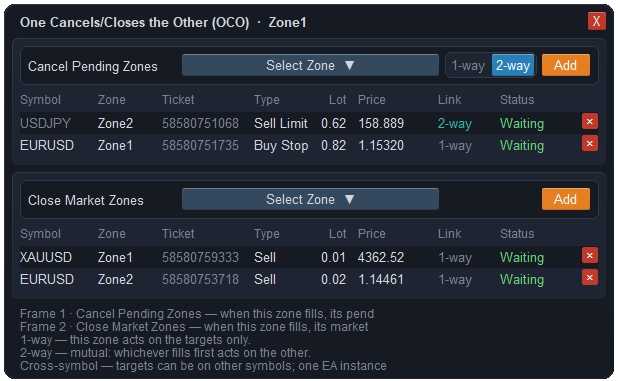
An open trade exits
For a position that is already running, the link fires when it closes, and each target is filed under take profit or under stop loss. When the trade ends, only the group that matches how it ended is acted on. These links are always one way.
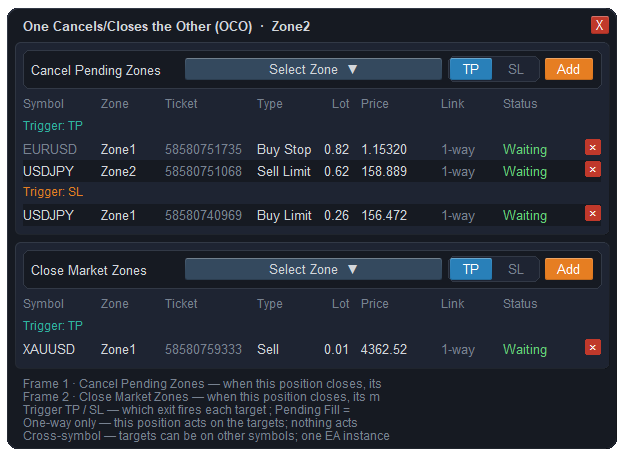
How it tells a win from a loss
It reads the reason the broker records for the closing deal:
- Closed by the take profit — the take-profit group acts.
- Closed by the stop loss — the stop-loss group acts. That includes a stop that had been moved to break-even or trailed into profit: to the broker it is still a stop loss, even if the trade made money.
- Closed by hand or by the EA — decided by the realised result: a profit counts as take profit, a loss as stop loss.
The second point is the one to plan for. If you trail a stop and want the clean-up to happen on a winning exit, put the targets under stop loss, because that is how the broker will report it.
Linking across symbols
The owner and its targets do not have to be on the same symbol, and their charts do not have to be open. One running copy of the EA keeps track of every link by ticket number, so an order on EURUSD can cancel one on GBPUSD while you are looking at gold. Two-way links work across symbols too. Virtual pending orders, which exist only inside the EA until price reaches them, can be owners or targets on the same terms as real ones.
Rules every link follows
- A link acts once. After it has done its job it does not fire again.
- If the broker refuses a cancel or a close, the EA tries again on the next pass rather than giving up. Targets that no longer exist are skipped.
- Adding an open position to the close list asks you to confirm first, because it will close a real trade.
- Each target shows its status live — still waiting, already filled, cancelled or closed — so you can see what the link will still act on.
What OCO will not do
- It is not on the broker's server. The EA does the cancelling. If MetaTrader is closed, both sides of a straddle are ordinary pending orders again, and both can fill. Keep the terminal running — a VPS is the usual answer — while linked orders are live.
- A very fast market can beat it. The cancel is a separate request sent after the fill. If two linked orders sit close together and news pushes price through both in the same instant, both can fill before the cancel arrives.
- Two-way is for pending orders only. A position that is already open can clear other orders when it exits, but nothing can cancel it back.
Questions
Does MT5 have OCO orders?
No. MetaTrader 5 has no One-Cancels-the-Other order type; each pending order is independent. OCO has to be added by an Expert Advisor that deletes the linked orders when one of them is triggered.
How do I place a buy stop and sell stop so one cancels the other?
Place both pending orders, open OCO on one of them, add the other to its cancel list, and switch that link to two-way. Whichever fills first then removes the other. Keep MetaTrader running until one of them has filled.
Does OCO work if MetaTrader is closed?
No. The link lives in the Expert Advisor, not on the broker's server, so nothing cancels the other orders while the terminal is closed. Run it on a VPS if linked orders need to stay live for long periods.
Can OCO link orders on different symbols?
Yes. The owner and its targets can be on any symbols, and their charts do not need to be open; the EA tracks each order by its ticket number.
My trade closed in profit on a trailed stop. Why did the stop-loss group fire?
Because the broker records any exit at the stop as a stop loss, wherever that stop had been moved to. If you want targets handled when a trailed trade exits, file them under stop loss.
Where this sits in the console
OCO is one part of the trade management side of ApeX Trading Console, next to staged take profits, break-even and trailing. The demo edition runs on demo accounts, which is enough to link a straddle and watch the opposite order disappear before real money is involved.