ApeX Indicator SMC draws Smart Money Concepts on a MetaTrader 5 chart: BOS and CHoCH labels for both short-term and larger swings, order blocks, equal highs and lows, fair value gaps, previous daily, weekly and monthly highs and lows, and premium and discount zones. Drag it onto a chart, then switch each part on or off in its Properties window.
How do I install it?
- Buy ApeX Indicator SMC on the MQL5 Market, signed in with the same MQL5 account as your terminal. The licence is handled by MQL5.
- In MetaTrader 5 open the Market tab of the Toolbox, then Purchased, and press Install. The indicator appears in the Navigator under Indicators › Market.
- Drag it onto any chart and press OK. A small ApeX Indicator bar appears with an SMC chip on it.
The free demo on the MQL5 Market runs only in the Strategy Tester. The drawing works there, but the bar and its menu cannot be clicked; use an ordinary chart for those.
The ApeX Indicator bar
Every ApeX indicator shares one bar. Load one and you see one chip; load several on the same chart and they still share a single bar, one chip each.

- Move it — drag the words ApeX Indicator. The position is kept per chart, including when you change timeframe.
- ● SMC — shows or hides everything SMC draws. Hidden means fully off, and your candles also return to their normal colours.
- ☰ — the picker. The tick column decides which indicators get a chip on the bar; the ● / ○ column decides which are drawn on the chart. Show all and Hide all act on every ApeX indicator loaded.
- Combine — at the top of the picker, this switch attaches the bar to the ApeX Trade Manager panel when the trade manager is on the same chart; slide it back to separate them. Without it, the switch shows
ApeX Console not found, which only means there is nothing to dock to.
What does it draw on the chart?
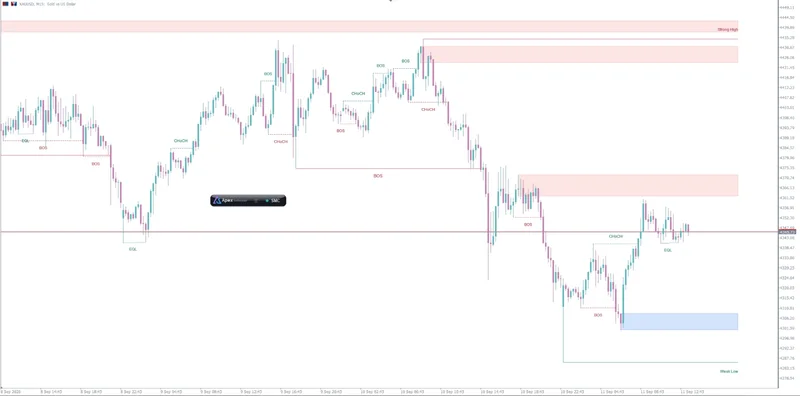
- BOS / CHoCH — a break of structure in the direction of the trend, and a change of character against it. Shown for short-term (internal) swings and for the larger swings separately.
- Order blocks — the zone where the move that broke structure started, kept until price uses it up.
- EQH / EQL — pairs of highs or lows at practically the same price, where stops tend to collect.
- Strong / weak high and low — which end of the current swing is protected and which is likely to be taken.
- Optional layers — fair value gaps (also from a higher timeframe), previous daily, weekly and monthly highs and lows, and premium, equilibrium and discount zones. All off by default.
Boxes are drawn behind the candles and never take your clicks, so you can still draw and drag trend lines and Fibonacci tools on top of them.
Settings by topic
Questions
Does ApeX Indicator SMC place trades?
No. It is an indicator, and MetaTrader 5 does not let indicators send orders. It draws and publishes its structure breaks; trading on them automatically needs ApeX Trade Manager on the same terminal.
Does the SMC indicator repaint?
Structure is confirmed on closed bars, and only closed-bar breaks are published as signals. The bar that is still forming can change until it closes, so a label that appears on it is provisional. An order block remains visible until price uses it, yet the break behind it happened once and is not repeated.
Can I use it with other ApeX indicators on the same chart?
Yes. ApeX indicators are built to share a chart: they use one bar between them, each with its own chip, and if the indicator that owns the bar is removed another takes it over by itself.
Which symbols and timeframes does it work on?
Any symbol your broker offers in MetaTrader 5, on any timeframe. On low timeframes, the fair value gap layer can show the gaps of a higher timeframe instead of its own.