MetaTrader 5 has no automatic break-even. Its built-in trailing stop follows price at a fixed distance, but nothing in the terminal moves a stop to the entry price once a trade has gone far enough in your favour — you either drag the stop yourself or let an Expert Advisor watch the position and do it.
An automatic break-even needs two answers: the condition that sets it off, and the price the stop moves to. The second matters more than it looks, because a stop placed exactly on the entry price still closes the trade at a small loss once spread and commission are paid.
Where should the stop actually go?
A buy is opened at the ask and closed at the bid, so the moment it opens it is already behind by the spread. Many accounts also charge a commission on the way in and on the way out. A true break-even stop sits past the entry by enough to pay for both, plus any extra margin you choose.
In ApeX Trading Console the break-even price is worked out as:
Break-even price = entry + spread + commission (in points) + buffer
- Spread — in points. Auto fills in the symbol's current spread, or you type your own figure.
- Commission — in money. Auto reads what the broker charged on the position and doubles it for the round trip; the EA then converts it into points using what one point is really worth on that position, so a larger lot does not need a different number.
- Buffer — extra points on top, if you want the stop to lock in a little rather than finish exactly flat.
For example, on EURUSD at one lot on a US-dollar account, a point is worth about one dollar. With a 12-point spread, a 7-dollar round-trip commission and a 5-point buffer, a buy entered at 1.10000 has its break-even stop at 1.10024 — 24 points past the entry, not on it.
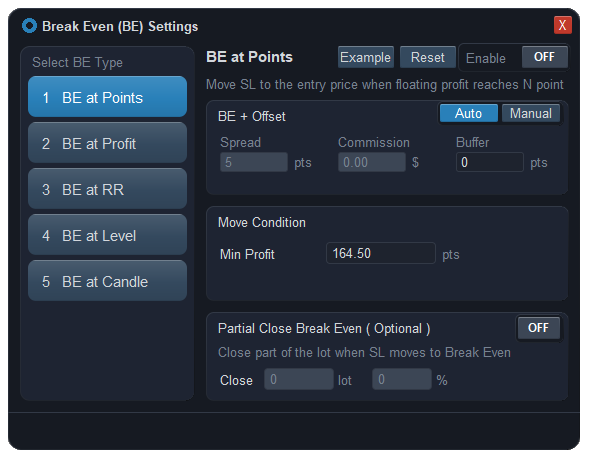
Five ways to trigger it
Each trade gets one trigger. They differ in what they measure, and that decides which kind of trading each one suits.
| Trigger | Fires when | Suits |
|---|---|---|
| BE at Points | The trade is a set number of points in profit. | A fixed rule you use on one market. |
| BE at Profit | The floating profit reaches an amount in your account currency. | Thinking in money rather than distance. |
| BE at RR | Price has moved a multiple of the risk, measured from entry to the furthest stop level. | Using one rule across symbols with very different stop sizes. |
| BE at Level | Price reaches a take-profit level you pick. | Taking profit in stages and protecting what is left after the first one. |
| BE at Candle | Price closes past the break-even price for a chosen number of consecutive candles, on the timeframe you pick. | Not being moved by a single spike. |
A few details decide whether a trigger can fire at all:
- BE at RR needs a stop loss on the trade. Without one there is no risk to measure, so it never fires.
- BE at Level works together with your take-profit levels: the level closes its own share first, then the stop on the remainder moves. Because that level is already closing part of the trade, this trigger has no partial-close option of its own.
- BE at Candle compares closes with the break-even price, costs included, not with the entry. It only counts candles that closed after the trade opened, and a single candle that closes short of the price starts the count again.
What happens the moment it fires
- If you asked for a partial close, that goes first — either a fixed lot or a percentage of whatever is still open at that moment, so earlier partial exits are taken into account.
- The stop moves to the break-even price. It happens once per trade.
- It never moves the stop backwards. If the stop is already better than break-even — because you dragged it, or a trailing stop got there first — nothing changes.
- If price has already fallen back behind the break-even price by the time the trigger is met, the stop cannot be placed there; the EA waits instead of sending an order the broker would reject.
With a virtual stop loss, the level the EA holds is what moves, and an emergency stop on the server can be set to follow it at the same distance. When the stop moves you can be told on the chart, on your phone through MetaTrader's push notifications, or on Telegram.
Seeing it on the chart
While break-even is set on a trade, two lines sit inside its zone on the chart. The purple one is the price the stop will move to; it is dashed while it is waiting and turns solid once the stop has moved. The gold dotted one marks the trigger — the profit, RR or take-profit level that sets it off — and can be dragged to change the value instead of typing it. You can set all of this while the order is still pending; it starts watching once the order fills.
What break-even will not do
- It does not guarantee you cannot lose. A stop becomes a market order when price touches it. Over a weekend gap, a news spike or thin liquidity, the fill can land beyond the stop, and a break-even trade can still close at a loss.
- Auto figures are a snapshot. The spread is read when you press Auto, not tracked afterwards, and commission can only be read from a trade that has already opened. If your spread widens a lot at certain hours, add buffer or set the figure yourself.
- A virtual stop needs the terminal running. If the stop is held by the EA rather than the broker, moving it to break-even changes nothing while MetaTrader is closed — keep the emergency stop on.
- Moving to break-even too early is still a choice with a cost. A trigger set close to the entry protects the trade sooner and gets stopped out by ordinary noise more often. The tool moves the stop when you tell it to; it does not choose the right distance for your strategy.
Questions
Does MT5 have an automatic break-even?
No. MetaTrader 5 has a trailing stop that follows price at a fixed distance, but no function that moves the stop to the entry price when a trade reaches a target. That needs an Expert Advisor that watches the position and modifies the stop for you.
Why is my break-even trade still closing at a small loss?
Because the stop was placed on the entry price. Spread and commission are paid on top of it, so exactly flat on the chart is slightly negative on the account. Add the spread and commission to the break-even price, plus a small buffer if you want to lock in something.
Which break-even trigger should I use?
Points or Profit if you trade one market with a fixed rule; RR if you use the same rule on symbols with very different stop sizes; Level if you take profit in stages; Candle if single spikes keep moving your stop before the move is real.
Can break-even close part of the trade at the same time?
Yes, for every trigger except Level. You set a fixed lot or a percentage of the open position; it closes first and then the stop on the rest moves to break-even. With Level, the take-profit you picked already closes its share.
Why did my break-even not trigger?
The usual reasons: RR is chosen but the trade has no stop loss; Level is chosen but the take-profit level was removed; Candle has closes that did not clear the break-even price including costs; the stop was already better than break-even; or price had fallen back behind the break-even price when the condition was met, so the EA is waiting.
Where this sits in the console
Break-even is one part of the trade management side of ApeX Trading Console, next to staged take profits, trailing stops and OCO. The demo edition runs on demo accounts, which is enough to set each trigger and watch the stop move before real money is involved.