A virtual stop loss is an exit price that the Expert Advisor keeps in its own memory instead of sending it to the broker. Nothing about that price exists on the server; the EA compares it against the market itself, tick by tick, and closes the position when the market gets there. A normal stop loss is the opposite: you hand the price to the broker, and the broker executes it whether or not your computer is switched on.
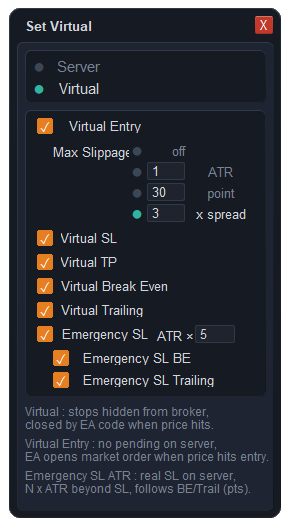
The same idea applies to take profits, to the move to break-even and to a trailing stop. In ApeX Trading Console each of those is a separate switch, so a single trade can be partly virtual and partly ordinary.
What actually changes
Four things, and only four. Everything else about the trade behaves the same way.
| Stop on the server | Virtual stop | |
|---|---|---|
| Who executes it | The broker. | The EA on your machine. |
| With MT5 closed | Still works. | Does not work — nothing is watching. |
| On the server there is | A stop price attached to the position. | No stop price, unless you keep an emergency one. |
| Exit speed | Server-side, immediate. | A market order sent when the EA sees the price. |
What can be made virtual
- Entry. No pending order is placed at all. The EA opens at market when your price is reached, and you can cap how far past that price a fill is still acceptable — off, a multiple of ATR, a number of points, or a multiple of the spread at that moment.
- Stop loss and take profit. Each can be switched independently, so a trade can keep an ordinary take profit on the server while its stop is virtual, or the other way round.
- Break-even and trailing. These move the level the EA is holding rather than sending a modification to the broker each time, which also means the order is not being modified over and over on the server.
The emergency stop, and what happens without it
Because a virtual stop needs the terminal to be alive, the console can place a real stop on the server anyway, set a multiple of ATR further out than the virtual one. It is deliberately far away, so in normal trading the virtual level is always the one that acts. It can be told to follow break-even and trailing moves too, keeping the same distance behind.
It is a checkbox. You can clear it. The following is the reason we would rather you did not clear it without thinking about it first.
- With it off, the server holds nothing. Not a wide stop, not a placeholder — nothing. If MetaTrader is closed, the computer sleeps, Windows restarts for an update or the connection drops, the position is open with no exit of any kind until the terminal is running again.
- A virtual exit is a market order. The EA reacts to the price it receives and then sends an order, so in a fast market the fill can land further away than a server-side stop would have. That is the cost of the level not being on the server.
- We make no claim that this protects you from anything. Keeping a level off the server is a mechanical fact about where the number is stored. It is not a claim about your broker's behaviour, and nothing here should be read as a way to get a better outcome from one. Use it because you want your exit logic to live with your rules, not because you expect it to change how the market treats you.
When it fits, and when it does not
It fits a trader who sits with the platform open during their session and wants the exit rules to be richer than one price: staged levels, a break-even that counts costs, a trailing method the terminal does not offer. In that situation the levels have to be run by something anyway, and keeping them in one place is simpler than half on the server and half not.
It does not fit a position you intend to leave open overnight on a machine you are going to shut down, and it does not fit anyone who is not willing to keep the emergency stop switched on. If your plan is to place a trade and walk away for days, an ordinary stop on the server is the right tool and there is nothing wrong with using it.
Questions
What is a virtual stop loss on MT5?
An exit price kept by an Expert Advisor rather than sent to the broker's server. The EA compares it against the market on every tick and closes the position with a market order when the price is reached, which means it only works while MetaTrader is running with the EA attached.
Does the broker see a virtual stop loss?
There is nothing on the server for it to see, because the price was never sent — that is simply how the mechanism works. It is not a protection feature and we make no claim about what it prevents. If an emergency stop is enabled, that one is a real order on the server and is visible in the ordinary way.
What happens if MetaTrader closes while a virtual stop is active?
The level stops being watched. If the emergency stop is enabled, a real order is still sitting on the server further out and the position is not unprotected. If it is switched off, the position has no exit at all until the terminal is running again — which is why that checkbox exists.
Can I use a virtual stop with a pending order?
Yes, and the entry itself can be virtual too: nothing whatsoever goes to the server, and the EA opens at market once your price is reached. You can also limit how far past that price a fill is still acceptable, as a figure times ATR, a flat count of points, or a figure times the spread of the moment.
Is a virtual exit slower than a normal stop loss?
It can be. A server-side stop is executed where it sits; a virtual one is a market order that the EA sends after it sees the price, so in a fast market the fill may be further away. That difference is the trade-off for keeping the level off the server, and it is worth weighing before you switch it on.
Where this sits in the console
Virtual levels are one part of the trade management side of ApeX Trading Console, alongside staged exits, five break-even triggers, ten trailing methods and OCO links that reach other symbols. The demo edition runs on a demo account, which is enough to set a virtual stop and watch it execute before any money is involved.