MetaTrader 5 cannot message Telegram by itself. Its own alerts go to the MetaTrader mobile app or to email. To reach Telegram, an Expert Advisor sends each message through a Telegram bot that you create, using your bot's token and the chats you allow it to write to. The message travels from your terminal straight to Telegram.
ApeX Trading Console uses that one bot for three separate jobs: alerts to you, trade signals to channels you run, and — with a small free service installed — commands from your phone.
Alerts to your own chat
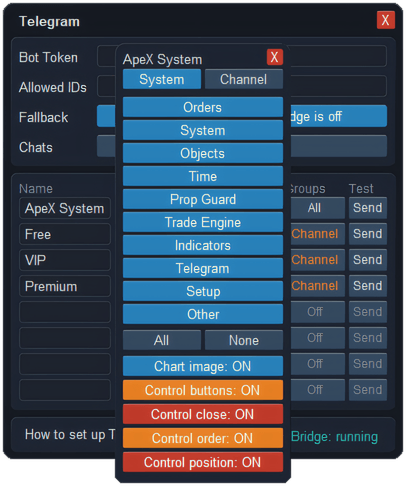
Every event in the Notify & Sound settings has its own Telegram switch, next to the on-screen and mobile ones. The events come in groups:
- Orders — a position opened, a pending order filled or expired, stop loss or take profit hit, a partial level closed, the stop moved to break-even or trailed.
- Chart objects and time — price touching a trendline, a rectangle or zone, or a horizontal line, and a candle closing on the timeframe you chose.
- News and system — a warning before scheduled news, price alert lines, an emergency stop, an OCO link firing, or an order the broker refused.
- Risk and the trade engine — a trade blocked by your prop-firm limits, a position with no stop on the server, and signals the engine found, placed or skipped.
You can use more than one chat and give each its own selection from the ten event groups shown in the window below, so orders can go to one chat and news to another. Each chat can also receive a picture of the chart with the message.
Sending signals to your channels
If you run Telegram channels for followers — say a free one and paid ones — a signal bar on the chart lists them. Tick one or several and press SEND, and those channels receive one message with the trade plan and one chart picture. The message can carry the entry, stop and target, and, if you choose, each partial take-profit and stop-loss level too. Every channel gets the same setup; what differs is which channels you tick.

In the signal setup you decide what goes out: which trades on the chart are included — drafts, pending orders, open positions — whether the partial levels are written into the message, whether to send the details, the chart picture or both, and an optional remark line of your own. The bar can sit across the chart or down its side.
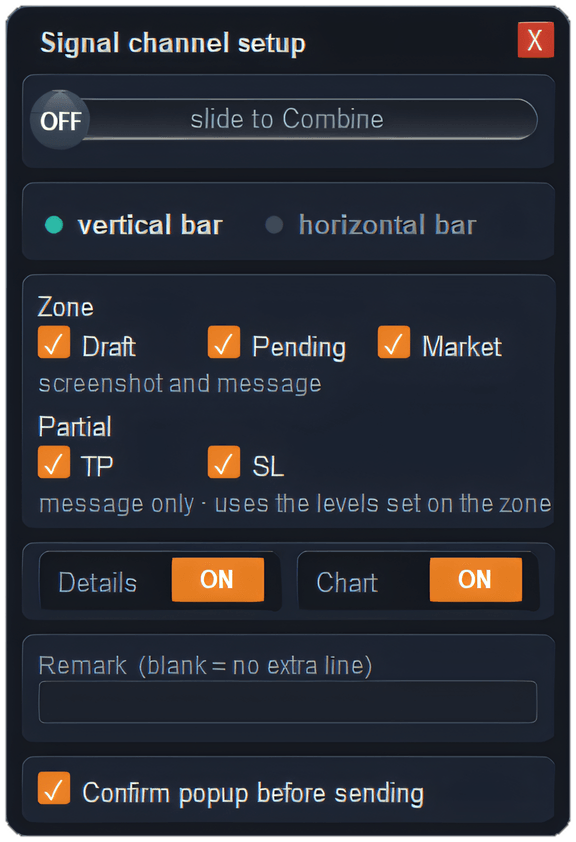

It is a manual tool: nothing is sent to a channel unless you press SEND, and with the confirmation box ticked you are asked once more first. Channels never receive your personal alerts or any buttons.
Control from your phone
With the free ApeX Telegram Bridge service running next to MetaTrader, one chat you choose becomes a control room. From there you can type commands:
| Command | What it does |
|---|---|
/account · /status · /risk |
Balance, equity and margin; drawdown and margin level; the chart, connection and counts. |
/positions · /orders · /pl |
Open positions with floating profit, pending orders waiting to fill — each with its own close or cancel button — and today's realised plus floating result. |
/close |
Close buttons like the panel's: all, in profit, in loss, buys, sells, and pending orders by type. |
/closeprofit>N · /closeloss>-N |
A button to close the trades above a profit, or below a loss, that you name. |
/screenshot · /help |
A picture of the chart right now, and the list of commands. |
A typed command never closes anything on its own. It replies with buttons, and nothing happens until you press one — so a typo cannot cost you a trade. The close commands act on trades opened by ApeX.
When the trade engine prepares a trade and waits for you, its message comes with buttons to place it as a pending order, execute it at market, or cancel it. Executing at market asks for a second confirmation that expires after two minutes, and it rechecks the price and lot before it sends. After a batch of closes, the reply tells you how many trades closed and roughly what was realised.
Setting it up
- In Telegram, create a bot with @BotFather and copy its token.
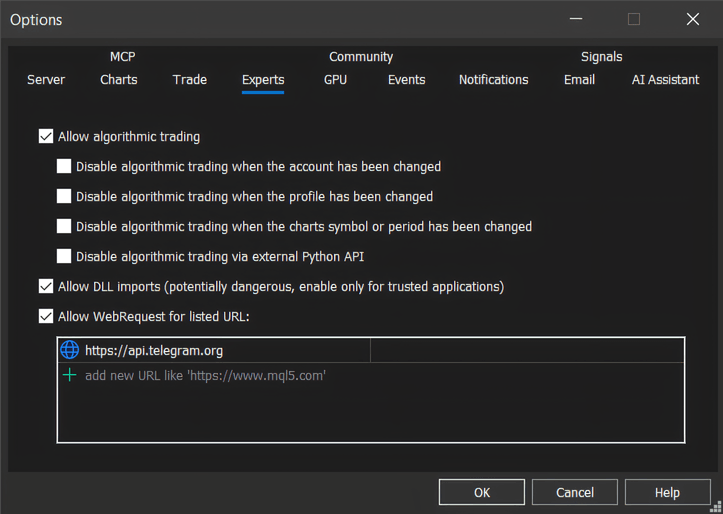
- In MetaTrader, open Tools › Options › Experts and add https://api.telegram.org to the WebRequest list.
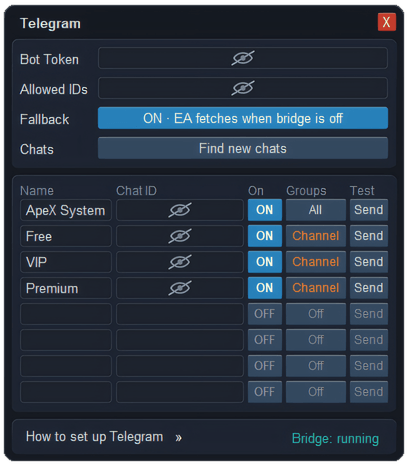
- In the ApeX Telegram settings, paste the token and put your own Telegram user ID in Allowed IDs. An empty list allows nobody. Your direct chat with the bot is filled in for you.
- For a group or channel, add the bot to it as an administrator, type
/apexthere, and press Find new chats within five minutes. Mark it as a System room for alerts or a Channel room for signals. - For commands, install the free ApeX Telegram Bridge service, turn on control buttons for one room, and switch on the control permissions you want. They start switched off.
What goes where
- The bot is yours. Messages go from your terminal to Telegram and are not relayed through our servers.
- Alerts and buttons go only to System rooms; signals go only to Channel rooms. The two paths never cross.
- Only the control room sees your account number, and only partly masked. Every other room sees no account details at all.
- There is one control room at most, only the Telegram IDs you listed can give commands, and each kind of control — closing, placing orders, managing positions — is a separate permission.
What it will not do
- Nothing is sent while MetaTrader is closed. Alerts, signals and replies all come from the running terminal. If you need them around the clock, run it on a VPS.
- "Sent" means handed over, not delivered. The confirmation after SEND means the message is queued to go out. If Telegram is down or the token has been changed, it will not arrive.
- Commands need the Bridge service. Without it, alerts and signals still go out as usual, but controlling the trade manager from your phone — typed commands and buttons alike — is slow and does not cover every function. Install the free Bridge to use all of it.
- It does not follow up on a signal. A signal posted to a channel is one message. Your followers are not told later when its levels are hit.
Questions
Can MetaTrader 5 send alerts to Telegram?
Not by itself. MetaTrader 5 sends push notifications to its own mobile app and to email. To reach Telegram you need an Expert Advisor that sends messages through a Telegram bot you create, with https://api.telegram.org allowed in the terminal's WebRequest list.
How do I send trade signals from MT5 to a Telegram channel?
Add your bot to the channel as an administrator, type /apex in the channel and press Find new chats, then mark it as a Channel room. The channel appears on the signal bar; tick it and press SEND, and it receives the trade plan with a chart picture.
Can I close trades from Telegram?
Yes, with the free ApeX Telegram Bridge service installed and the close permission switched on for your control room. /positions lists each trade with its own close button, and /close offers the same group closes as the panel.
Will my followers see my account number?
No. Channel rooms only ever receive the signals you send, with no account details. Your account number appears only in your control room, and even there it is partly masked.
Why does Find new chats not show my channel?
The bot has to be an administrator of the channel, and /apex has to be posted there within the last five minutes before you press the button. Post it again and press Find new chats straight away.
Where this sits in the console
Telegram is part of the alerts side of ApeX Trading Console, alongside the on-screen cards, MetaTrader's own mobile push and sound. The demo edition runs on demo accounts, which is enough to connect a bot and receive your first alerts before real money is involved.