 +
+

SMC auto trading with ApeX means the SMC indicator spots a break of structure or a change of character, and ApeX Trade Manager places the trade from the order block behind it: entry inside the block, stop beyond its far edge, lot size from your risk, then partial take profits, break-even and trailing. By default each valid signal becomes a draft on the chart that waits for you to press Execute, so you can start semi-automatic and let it place orders on its own later.
What does the trade manager add to the SMC indicator?
| Step | SMC indicator on its ownApeX Indicator SMC | With ApeX Trade Manager MT5Expert Advisor for MT5 |
|---|---|---|
| Finding the setup | BOS, CHoCH and order blocks drawn on the chart. | The same drawing, plus the breaks are read as signals. |
| Entry and stop | You measure the block yourself. | Set from the order block by fixed rules. |
| Lot size | Your own calculation. | From a percent, a money amount or a fixed lot. |
| Placing the order | By hand — an indicator cannot trade. | Draft to confirm, pending order, or market order. |
| After entry | Watched and adjusted by you. | Partial take profits, break-even and trailing in R. |
Which SMC signals does it trade?
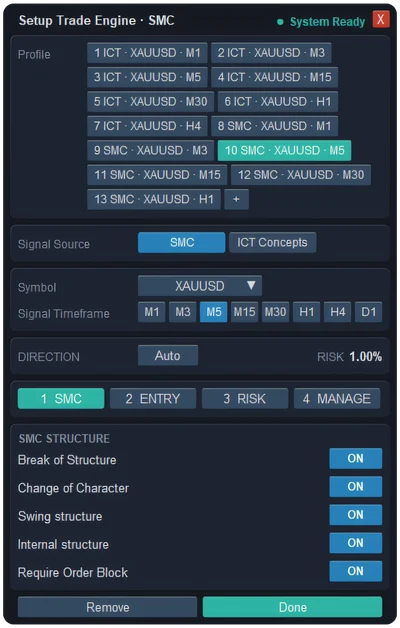
Every signal comes from a candle that has already closed, so nothing is traded on a break that might still disappear. The SMC STRUCTURE tab decides which of them count:
- Break of Structure / Change of Character — both on. Take continuation breaks, reversals, or both.
- Swing structure / Internal structure — both on. The SMC indicator tracks two sizes of structure; turn off Internal to trade only the larger swings and see far fewer, slower signals.
- Require Order Block — on. A break without an order block behind it is skipped, because the block is what sets the entry and the stop.
The allowed direction can be Auto, Buy only or Sell only, and each engine follows one symbol on one timeframe of your choice.
How does a signal become a trade?
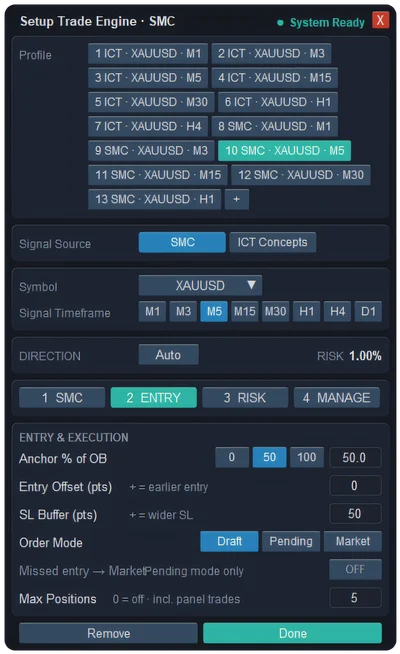
- Entry. Placed inside the order block at the Anchor % you choose — 0 is the edge price reaches first, 50 the middle (default), 100 the far edge — and an optional offset in points to fill earlier or wait deeper.
- Stop. Beyond the far edge of the block plus an SL buffer, 50 points by default, to stay clear of wicks.
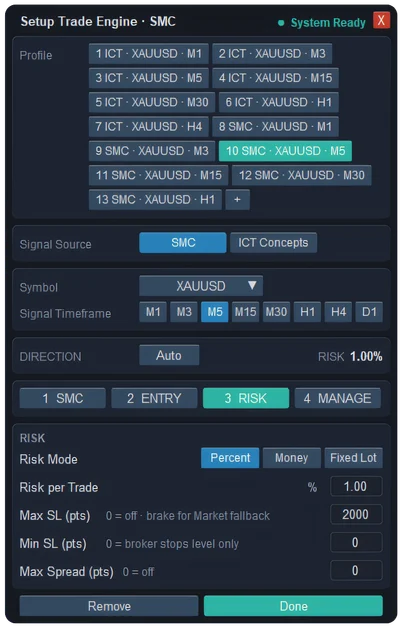
- Size. Worked out from the stop distance and your risk per trade: 1% of balance by default, or a money amount, or a fixed lot.
- Targets. Up to 10 partial take profits measured in R. The default is three — 1R, 2R and 3R, closing 30%, 40% and 30% — with the order's own target one R past the last level.
- Order. Draft (default) draws the plan for you to execute; Pending sends a limit order to the broker; Market enters at once. In Pending mode you can choose to enter at market if price has already run past the entry.
- Management. Break-even at 1R and trailing that locks profit every 1R are on by default, run by the same engine the trade manager uses for your manual trades.
When does it skip a signal?
- The stop would be wider than Max SL (2000 points by default) or tighter than Min SL.
- The spread is above Max Spread, if you set one.
- The entry sits more than 8R away from the current price.
- A pending order is already waiting at the same entry.
- Max Positions is reached — 1 by default, and it counts trades you opened from the panel too.
A skipped signal is not silent: you get a Signal Skipped notification that names the reason, so you know which setting to change.
How do I switch it on?
- Put ApeX Trade Manager and ApeX Indicator SMC on the same chart, and use the Combine switch to dock the indicator bar onto the trade manager panel.
- Open the Trade Signal Engine window from the bar and press ☰ at the end of the SMC row. The Setup Trade Engine window opens.
- Set Signal Source to SMC, pick the symbol and signal timeframe, go through the four tabs, and press Done.
- A TRADE ENGINE list appears in the Trade Signal Engine window with an OFF | ON switch for the engine. Nothing trades until you turn it on.
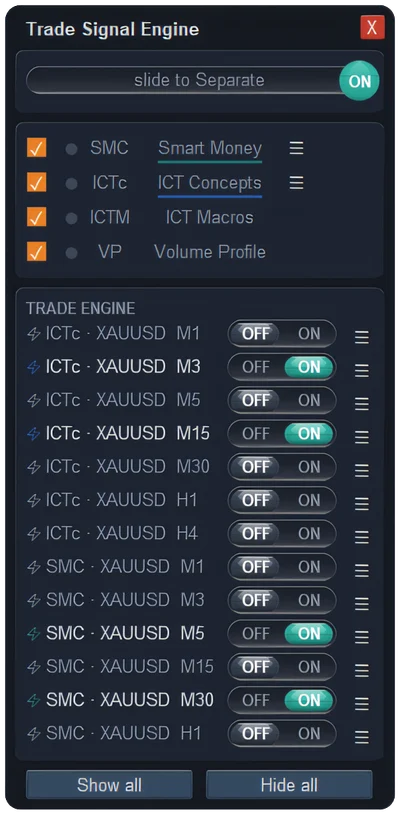
Each indicator can run up to 20 engines, for other symbols, other timeframes or other settings, each with its own switch.
Questions
Is it fully automatic?
Only if you choose. Out of the box it runs in Draft mode: it prepares the trade and you press Execute. Switch Order Mode to Pending or Market when you trust the settings.
Does it enter at fair value gaps?
Not with the SMC indicator. Its signals carry an order block only, so the block is always the entry zone. If you want entries at fair value gaps, the ICT Concepts pairing offers order block, fair value gap, or order block first and fair value gap if there is none. ICT auto trading →
I changed the indicator's settings on my chart. Does the auto trading follow?
Not by itself. The trade manager runs its own copy of the indicator in the background, with a swing length of 50 by default. If you changed the swing length on your chart, set the same value in the trade manager's Auto Trade settings so both see the same structure.
Can I run an SMC engine and an ICT engine together?
Yes. Each engine has its own signal source, so one can follow SMC and another ICT Concepts. Keep an eye on Max Positions, which is shared by every trade the trade manager holds.