MetaTrader 5 has an economic calendar in the Toolbox, but it sits in a separate tab away from the chart and does not warn you before an event. ApeX Trading Console puts the week's events on a News tab next to your chart, filters them by impact, day and currency, and can warn you ahead of high, medium or low impact news for the currencies you pick, as many minutes early as you choose.
The News tab
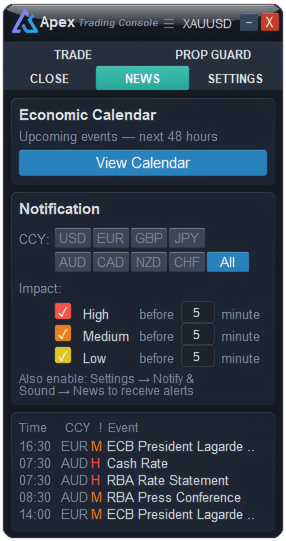
The tab has three parts:
- Economic Calendar — View Calendar opens the full table for the week.
- Notification — the currencies and impact levels you want to be warned about, and how many minutes ahead.
- Upcoming list — the next events, with time, currency, impact and name.
The full calendar
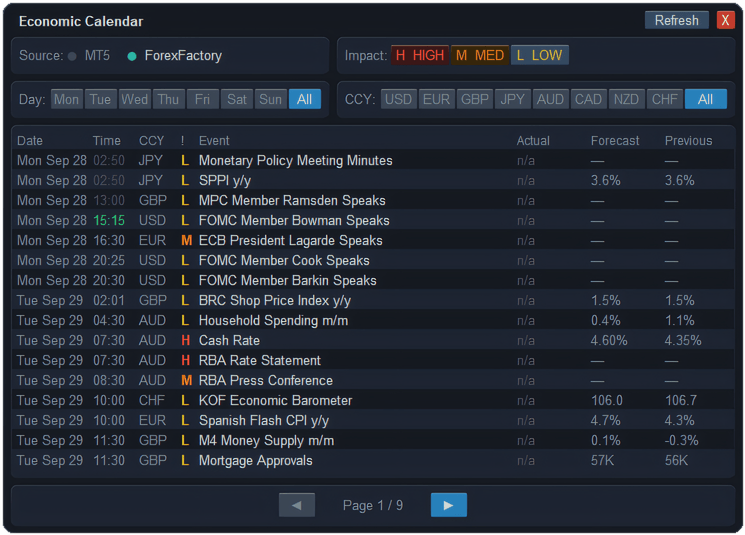
The calendar window covers the whole week, Sunday to Sunday. Narrow it down with the filters across the top:
- Impact — high (H), medium (M) and low (L), each switched on or off.
- Day — one day of the week, or all.
- CCY — all of them, or any of the eight majors on their own.
Each row shows the date and time, currency, impact, event, and the actual, forecast and previous figures. An n/a means the event never has a number — a speech, a meeting, a holiday — while a dash means the figure has not been released yet. Times are your broker's server time, the same clock as the chart.
How do you get an alert before news?
- On the News tab, pick the currencies you trade, or All.
- Tick the impact levels you care about, and set how many minutes before the event each one should warn you.
- In Settings › Notify & Sound, make sure the News row is on for the channels you want — on screen, on your phone or on Telegram. Without it, nothing is sent.
The same calendar feeds Prop Guard's news rules, which work on high-impact events only. More on Prop Guard →
MT5 or ForexFactory — which source?
| Source | Good to know |
|---|---|
| MT5 | The calendar built into MetaTrader, supplied through your broker. Nothing to set up. Actual figures appear when the broker's calendar provides them — some do not. |
| ForexFactory | ForexFactory's public weekly feed. Add https://nfs.faireconomy.media under Tools › Options › Experts › Allow WebRequest for listed URL. This feed has forecast and previous figures but no actual, so that column always shows n/a. Its times depend on your computer's clock and time zone being right. |
If ForexFactory cannot be reached, the console tells you how to allow it and switches back to MT5. The data is fetched again every hour, or straight away when you press Refresh.
What it will not do
- It cannot invent figures. If the source has no actual value, neither does the table.
- It is not a trading signal. It tells you when an event is due, not which way price will go.
- Alerts need MetaTrader running. The console sends them, so with the terminal closed there is no warning.
Questions
Does MT5 have an economic calendar?
Yes, in the Calendar tab of the Toolbox. It does not sit on the chart or alert you before events; the console adds both.
Why does the Actual column say n/a?
Either the event never has a number, such as a speech, or you are on the ForexFactory source, whose free feed does not include actual figures. Switch to MT5 to see them where your broker provides them.
I set up news alerts but nothing arrives. Why?
Check the News row in Settings › Notify & Sound is switched on for the channel you expect, that the currency and impact level are ticked on the News tab, and that MetaTrader is running.
Checked against ApeX Trading Console 6.593.