MetaTrader 5 has no account-wide loss limit: every stop belongs to one trade, and nothing stops you opening the trade that breaks a prop firm's daily loss rule. Prop Guard adds that layer. You set a daily loss limit and a maximum drawdown; it refuses new trades that could push you over them, and when the account gets close to a limit it either closes everything or locks trading.
The basics, in four steps
Open the setup
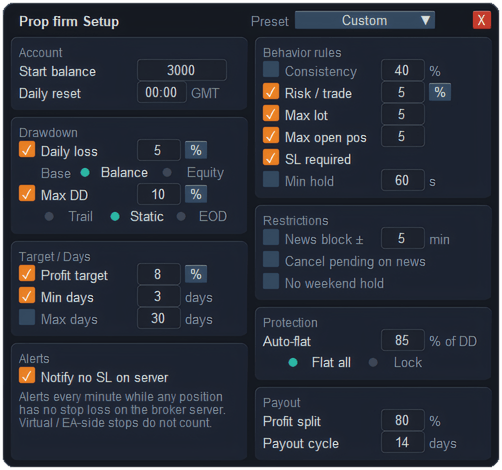
On the Prop Guard tab press More detail, then Setup… Pick your firm from Preset to fill in its usual numbers, or leave it on Custom. Enter the account's starting balance.
Set the two limits
Daily loss and Max DD, each in percent or money. Daily loss can be measured from balance or equity; Max DD can be trailing, static or end-of-day, to match your firm's wording.
Choose what happens near a limit
Auto-flat is the percentage of a limit at which Prop Guard steps in — 85% means it acts when you have used 85% of the allowed loss. Then choose Flat all, to close everything, or Lock, to stop new trades and leave open ones alone.
Switch it on
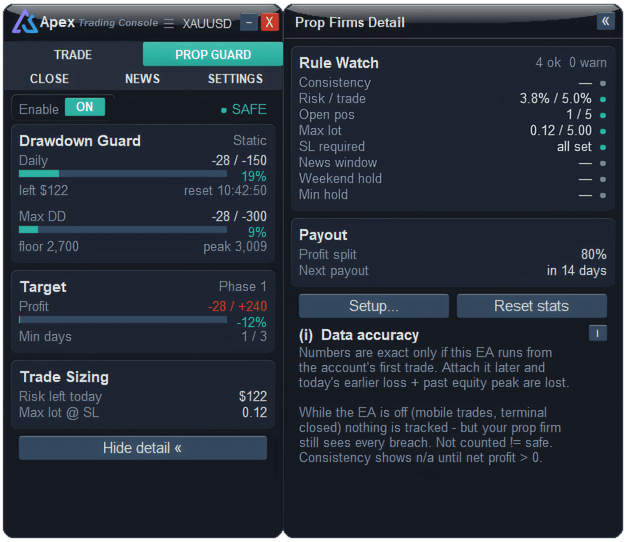
Set Enable to ON on the tab. The status beside it shows how close you are, and the cards show each limit with its bar, what is left today and the largest lot you can still open at your stop.
What does Prop Guard actually enforce?
| Guard | What it does |
|---|---|
| Check before opening | Adds today's loss, what your open trades would lose at their stops, and what the new trade would lose at its stop. If that total reaches the Auto-flat level, the trade is not opened and you are told how much room is left. A trade with no stop is judged with your default stop distance. |
| Flat all | When a limit reaches the Auto-flat level, a 10-second countdown appears with a Cancel auto-flat button. If nothing changes, all positions on the account get closed and all pending orders go too. If the account recovers during the countdown, it stands down on its own. |
| Lock | Instead of closing, it stops any new trade from opening. Open trades keep running. Unlock by switching Enable off or pressing Reset stats. |
| News block | No new trades within the minutes you set either side of a high-impact event for the symbol's currencies. |
| Cancel pending on news | Before that window opens, a 30-second countdown lists the pending orders that would be removed, then removes them — including ones the EA holds itself. |
| Notify no SL on server | A reminder every minute while any position has no stop at the broker. Virtual stops do not count, because the firm cannot see them. |
What it only watches
Firms have other rules, and Prop Guard keeps an eye on them in Rule Watch, each with a green, orange or red dot. These show you where you stand; they do not block or close anything.
- Consistency — how big your best day is compared with your total profit.
- Risk / trade — the heaviest open trade's risk at its stop.
- Open pos · Max lot — how many positions are open, and their lots added together.
- SL required — whether every position has a stop at the broker.
- News window · Weekend hold · Min hold — time to the next high-impact event, time left before the weekend with trades still open, and whether the newest trade has been held long enough.
The Target card follows your profit target and trading days, and Payout counts down to the next payout date. Both are for tracking only.
Trailing, static or end-of-day drawdown?
- Static — the floor is fixed below the starting balance and never moves.
- Trail — the floor follows the account's highest point, so profit raises it.
- EOD — like trailing, but the high point is only taken at the end of each day.
Read your firm's rulebook for which one it uses. Getting this wrong makes the numbers look safer, or tighter, than they really are.
What Prop Guard will not do
- It only knows what it has seen. The numbers are exact only if the console has run since the account's first trade. Attach it later and it cannot know today's earlier loss or the past high. Trades placed from your phone while MetaTrader is closed are not tracked — but the firm still counts them.
- Flat all closes everything. Every position and pending order on the account, including manual trades and other EAs'. That is the point, but know it before you choose it.
- It cannot beat a gap. Closing at the Auto-flat level happens at market. A fast move can carry the account past it before the closes are done — which is why the level should sit below 100%.
- No calendar, no news block. If the economic calendar cannot be loaded, the news rule shows "no data" rather than pretending it is clear, and it does not block.
- Presets are a starting point. Firms change their rules and offer different programmes. Check every number against your own account's rules.
Questions
Can MT5 stop me from breaking a daily loss limit?
Not by itself. It has no account-wide loss limit. An Expert Advisor such as Prop Guard has to watch the account, refuse trades that could breach the limit, and step in before it is reached.
Why was my trade blocked when I was not losing?
Because the check counts what your open trades and the new one would lose if every stop were hit. Several open trades with wide stops can use up the room on their own. Reduce the lot or tighten a stop — the message says how much room is left.
How do I unlock trading after a Lock?
Switch Enable off, or press Reset stats in the detail panel. Only do it when you are sure the firm's own limits allow you to keep trading.
Does Prop Guard enforce consistency and minimum hold time?
No. Those appear in Rule Watch with a coloured dot so you can see them coming, but they do not block or close trades. Only the loss limits, the news rules and Lock stop anything.
Checked against ApeX Trading Console 6.593.