MetaTrader 5 gives each position one take profit and one stop loss. ApeX Trading Console adds up to ten extra take-profit levels and ten extra stop-loss levels to a trade. Each one is a line on the chart and a row in a table that says how much of the position closes there. When price reaches a level, the console closes that share at market and leaves the rest running.
The basics, in four steps
Open the level table
Click ☰ on the trade's box to open Zone Options, then Set TP Levels or Set SL Levels. It works on a draft too, so you can plan the exits before you press Execute. Each table also has its own hotkey if you bind one.
Add levels
Press + Add TP or + Add SL. A new line appears part-way from where price is now to the main target or stop, with its own row in the table. You can have up to ten on each side.
Put each level where you want it
Drag its line on the chart. For a take-profit level you can type an RR instead, and the line moves to that multiple of the risk.
Decide how much each one closes
Type a percentage, or type the lot straight into Close lot if you think in lots. The Remain column shows what would still be open after each level.
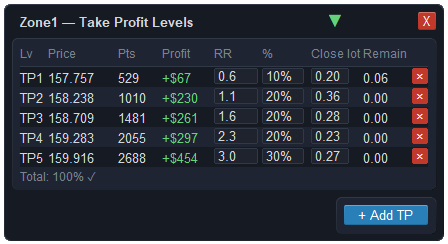
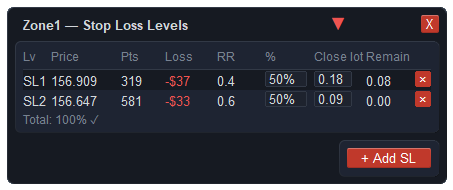
What each column means
| Column | Shows |
|---|---|
| Lv | TP1, TP2… or SL1, SL2…, numbered in price order, starting with the one nearest the entry. |
| Price · Pts | Where the level is, and how far it is from the entry in points. |
| Profit · Loss | What that level's share would bank or cost if it closes there, in your account currency. |
| RR | The distance as a multiple of the risk. On the take-profit side you can type it to place the line. |
| % · Close lot | How much closes at that level — as a percentage or as a lot. Change either and the other follows. |
| Remain | The lot still open after this level has closed its share. |
| × | Removes the level. Levels that have already fired are locked and cannot be edited or removed. |
Under the rows, a total adds up the percentages and warns you if they go over 100%.
How is the share for each level worked out?
Each percentage is taken from what is still open after the levels before it on the same side — not from the lot you started with. The result is rounded down to the broker's lot step.
For example, a 1.00 lot trade with take-profit levels at 50%, 30% and 20%:
TP2 30% of 0.50 → closes 0.15 · 0.35 left
TP3 20% of 0.35 → closes 0.07 · 0.28 left
The 0.28 left over rides to the trade's main target or stop. If you would rather close exact amounts, type them into Close lot and read the Remain column.
On a draft the lots follow your risk as you move the box. Once the trade is open, each level's lot is fixed at the moment you add it, execute, or edit it, so it does not shift on its own later.
What happens when price reaches a level
- The console closes that level's lot at market — using the bid for a buy and the ask for a sell — never more than is still open.
- The row locks, and you are told: for example "TP1 hit @ 1.10250 · Closed 0.50 · left 0.50" with the money booked.
- The rest carries on to the next level, or to the main target or stop.
A stop-loss level does not have to be a loss. After break-even or a trailing stop has moved the stop into profit, a stop level can sit in profit too, locking in part of the gain.
What it will not do
- Levels are not orders at the broker. The console watches price and closes the share itself, so MetaTrader has to be running with Algo Trading on. The trade's main stop and target are still with the broker.
- The fill is the market price at that moment. In a gap or a fast move the close can be some distance past the line.
- Very small shares are skipped. A level whose lot is below the broker's minimum lot cannot be closed on its own, so nothing happens there. Check the Close lot column on small trades.
- Nothing happens while the market is closed. The console waits and acts once the symbol is trading again.
Questions
Can MT5 have more than one take profit on a trade?
Not by itself — each position has one take profit and one stop loss. To take profit in stages you either split the trade into several positions or use an Expert Advisor that closes parts of one position at each level.
Why does 50%, 30% and 20% not close the whole trade?
Because each percentage is of what is left after the levels before it, not of the starting lot. Watch the Remain column, or type exact lots into Close lot if you want the levels to empty the trade.
Why was my level not added?
There was no room for it: either the main stop is already right next to price, or price is already at or past the main target. Move the main stop or target further out first.
Can I change a level after it has fired?
No. A level that has closed its share is locked, so the history of what closed where stays true. You can still change the levels that have not fired.
Checked against ApeX Trading Console 6.593.