ApeX Trading Console, a trade manager for MetaTrader 5, can warn you on MT5 ahead of a candle close, by as many minutes as you choose, on any timeframe from M1 to monthly. Open ☰C on the Tools bar, pick the timeframe, say how many bars ahead (the current candle is bar 1) and how many minutes before the close, then press Apply. The alert can repeat up to ten times, ten seconds apart, and reaches you on screen or, if you switch it on, on your phone and Telegram. The same window can also keep the time left on M1 to H4 candles in view on the chart.
Opening it
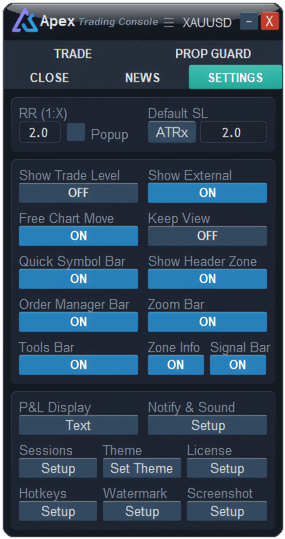
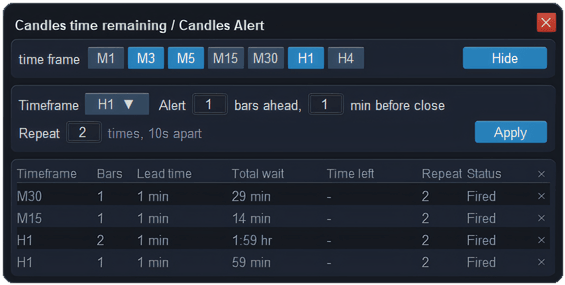
Press ☰C on the Tools bar. If the bar is not on your chart, turn Tools Bar on in the panel’s Settings tab. The window has three parts: the countdown at the top, the alert form in the middle, and your alerts at the bottom.

How do you set an alert before a candle closes?
- Press the Timeframe button and pick one, from M1 up to MN.
- Alert … bars ahead: which candle you mean. 1 is the candle forming now, 2 is the next one, 3 the one after that.
- … min before close: how early you want to hear about it. 0 means at the close itself.
- Repeat … times: how many alerts, from 1 to 10, ten seconds apart.
- Press Apply. A new row appears in the list and starts counting down.
The form remembers what you typed, so the next alert starts from the same values.
How are the bars counted?
From the open of the candle forming now. The alert time is that open, plus the number of bars times the timeframe, minus the minutes before close. It is fixed the moment you press Apply, so switching the chart to another timeframe or symbol afterwards does not move it.
For example, it is 10:07 and the current M15 candle opened at 10:00. You set 3 bars ahead and 1 minute before close. The third candle closes at 10:45, so the alert comes at 10:44. The list shows a total wait of 44 minutes, counted from 10:00, and a time left of 37 minutes.
If the alert time has already passed — say a lead of 20 minutes on the current M15 candle — Apply tells you it is too late. Add more bars or shorten the lead.
What does the list show?
| Column | Meaning |
|---|---|
| Timeframe · Bars · Lead time | What you set. |
| Total wait | From the open of the candle you started on to the alert. |
| Time left | A live countdown to the alert. |
| Repeat | How many alerts you will get. |
| Status | Waiting, then Fired. A fired row stays, greyed out, until you delete it. |
| ✕ | Deletes the row. The ✕ in the header deletes every row, after asking you first. |
You can keep up to 20 rows. They are saved, so they survive a timeframe change or a restart of MetaTrader. Fired rows older than a week are cleared out on their own.
Can MT5 show how long until the candle closes?
Yes. The console can put a small floating bar on the chart that shows how long the current candle has left on each timeframe you pick. It is switched on from the top row of the same ☰C window:
- Press ☰C on the Tools bar.
- In the top row, next to "time frame", click the timeframes you want, from M1 up to H4, as many as you like. Chosen ones turn blue; click again to drop one.
- Press Show at the right end of that row. The bar appears on the chart and the button now reads Hide.

The numbers move every second from the server clock, even when the market is quiet. You can close the ☰C window and the bar stays. To remove it, open ☰C again and press Hide; the timeframes you picked are kept for next time. You need at least one timeframe chosen before Show will work.
Where does the alert go?
Candle alerts are the Candle Close row, in the Time group of Notify & Sound. To begin with it only shows a card on screen and plays a short tick. If you want it on your phone or on Telegram, tick Mobile or Telegram on that row. The card reads, for example, "M15 candle closes in 1 min (1/3)", or "M15 candle just closed" when the lead is 0.
What it will not do
- Each row goes off once. It does not re-arm for the next candle. For another alert, press Apply again.
- It follows the broker’s server time. MetaTrader moves that clock forward with each new price, so in a very quiet market an alert can come a few seconds late. If the market is closed at the alert time, it comes with the first price after it opens.
- Nothing is sent while MetaTrader is closed. The console keeps the time, so the terminal has to be running — on your computer or a VPS.
- The countdown bar stops at H4. Alerts work on D1, W1 and MN too; the bar does not show them.
Questions
How do I get an alert when a candle closes in MT5?
Open ☰C, choose the timeframe, set 1 bar ahead and 0 minutes before close, and press Apply. You are told when the current candle closes.
Does it matter which chart I set it on?
No. Candle closes follow the server clock, not the symbol, and the time is fixed when you press Apply. Changing the chart afterwards changes nothing.
Why does Apply say it is too late?
The alert time you asked for is already behind you — usually a long lead on the candle forming now. Set more bars ahead, or fewer minutes before close.
Checked against ApeX Trading Console 6.593.