ApeX Trading Console, a trade manager for MetaTrader 5, draws the Sydney, Tokyo, London and New York sessions as thin coloured bars along the bottom of the chart, already converted to your broker's time. London and New York shift by an hour on their own when summer time starts and ends. To switch them on or off, open the panel's Settings tab and press Setup under Sessions; you can show all four markets or only the ones you trade. A white tick marks the candle forming now, so the markets open right now are obvious.
How do you show market sessions on the chart?
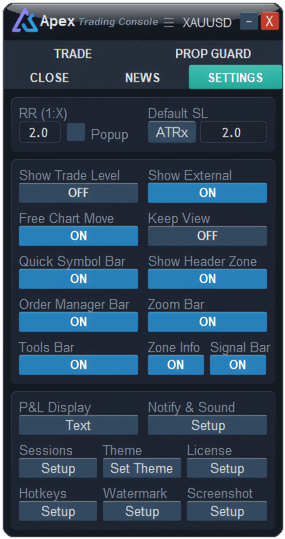
- Open the Settings tab of the panel.
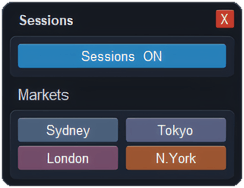
- Under Sessions, press Setup. A small Sessions window opens next to the panel.
- The top button switches every session on or off at once. It turns blue and reads Sessions ON when they are showing.
- Under Markets, click Sydney, Tokyo, London or N.York to show or hide that one. A market that is on keeps its colour; one that is off turns grey.
- Close the window with X. Every click takes effect straight away and is remembered.
All four markets are on when you first install the console.
How do you read the session bars?
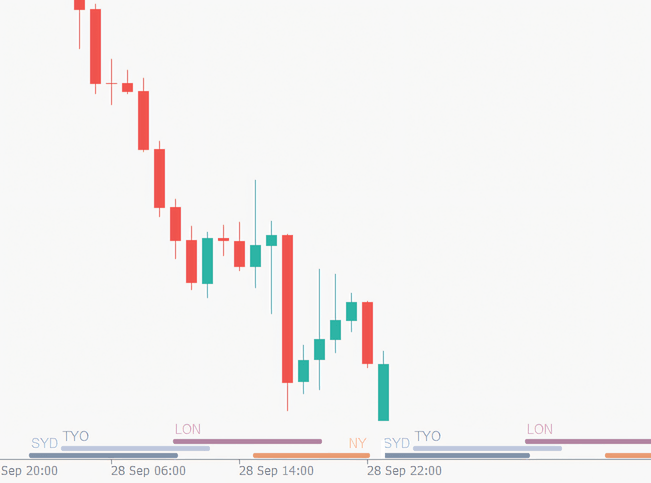
Each market is a coloured bar that starts at the market's open and ends at its close, with a short label: SYD, TYO, LON or NY. The bars sit in three thin rows at the very bottom of the chart — London on top, Tokyo in the middle, Sydney and New York sharing the lowest row, since they never overlap. Where two bars sit one above the other, both markets are open at once; the London and New York overlap is the easiest to spot.
| Market | Label | Colour | Row |
|---|---|---|---|
| Sydney | SYD | Slate grey | Bottom |
| Tokyo | TYO | Grey-blue | Middle |
| London | LON | Rose | Top |
| New York | NY | Orange | Bottom |
The short white upright line at the bottom marks the candle forming now; on a white chart background it shows as a narrow gap cutting through the bars. Whatever bars it touches are the sessions open at this moment. The bars also run ahead into the empty space on the right, so you can see when the next session begins.
The bars stay pinned to the bottom edge and keep the same thickness when you scroll, zoom or stretch the price scale, so they never cover the candles you are reading.
What hours does each session cover?
The console works in UTC and moves the bars to your broker's clock for you. Summer time here means the UK dates for London and the US dates for New York.
| Market | UTC, winter | UTC, summer time | Thailand (UTC+7), winter |
|---|---|---|---|
| Sydney | 22:00 – 07:00 | Same | 05:00 – 14:00 |
| Tokyo | 00:00 – 09:00 | Same | 07:00 – 16:00 |
| London | 08:00 – 17:00 | 07:00 – 16:00 | 15:00 – 00:00 |
| New York | 13:00 – 22:00 | 12:00 – 21:00 | 20:00 – 05:00 |
In summer time, take an hour off the London and New York rows for Thailand as well: London 14:00 – 23:00 and New York 19:00 – 04:00. Sydney's bar begins the evening before in UTC, which is why Monday's Sydney session already shows on Sunday night.
Does it follow my broker's time and summer time?
Yes, both. MT5 charts run on the broker's server clock, which is often two or three hours ahead of UTC and changes during the year. The console reads the gap between the server clock and UTC and places each bar on the right candles, so you never enter an offset yourself. The one-hour shifts for London and New York happen on their own on the UK and US changeover dates — including the short spells in March and around the start of November when the two countries are out of step.
Can I show or hide sessions with a key?
Yes. In the Hotkeys window, find "Show or hide trading session boxes" in the Overlays group and give it a key. Pressing it works like the Sessions ON / OFF button: it hides or shows every market you have left switched on.
What it will not do
- It covers a few days, not the whole chart. About two days back and two days ahead. Scroll further into the past and the bars end.
- Not on D1, W1 or MN. A whole session fits inside one candle there, so the bars and the white tick are hidden.
- No weekends. Nothing is drawn for Saturday or Sunday, and on Friday the bars stop at the end of the day.
- Best read while the market is open. The broker's clock stops with the last price, so at the weekend the bars can sit in the wrong place until trading starts again.
- The hours are fixed. You choose which markets show, not when they open. Local holidays and early closes are not marked.
Questions
When do the London and New York sessions overlap?
From 13:00 to 17:00 UTC in winter and from 12:00 to 16:00 UTC in summer time — 20:00 to midnight in Thailand in winter. On the chart it is where the rose London bar sits above the orange New York bar.
Can I hide the white line and keep the bars?
No. The white tick belongs to the sessions and follows the same switch. It disappears only when sessions are off or every market is off.
Checked against ApeX Trading Console 6.593.