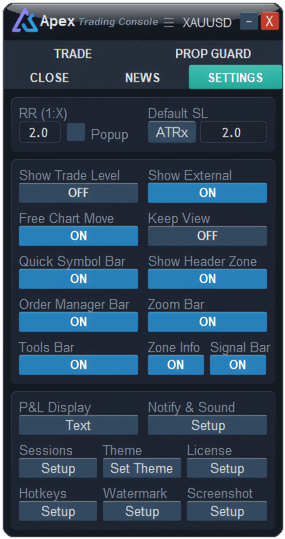
ApeX Trading Console, an MT5 trade manager, lets you drag the chart up and down with the mouse, past the highest or lowest price on screen, so there is empty space to draw a target or a plan. Turn on Free Chart Move in the panel’s Settings tab, then drag anywhere on the chart: up and down moves the price range one to one, and sideways scrolls through time as usual. The price scale on the right still stretches the normal way. It is on from the first install, and F switches it on and off.
How do you turn it on?
Open the Settings tab of the panel and look for Free Chart Move. Blue ON means it is working; press it to switch to OFF and the chart goes back to MetaTrader’s own automatic scale. The choice is remembered, including across timeframe changes.
How do you move the chart up and down in MT5?
With Free Chart Move on, press anywhere on the empty part of the chart and drag:
- Up or down moves the price range by exactly as much as your hand moves. Keep going past the highest or lowest candle and you get clear space to draw in.
- Left or right scrolls through time, as MetaTrader normally does. A diagonal drag does both at once.
- The chart stays where you left it. The zoom does not jump back every time a new price arrives.
Pressing on one of your trade boxes, on the panel or on an open window does not move the chart, so you can still drag a stop or a box without the chart sliding underneath.
Can I still stretch the price scale?
Yes. Drag the price scale on the right edge up or down, the normal MetaTrader way, to stretch or squeeze the candles. Zooming in and out in time with the mouse wheel or the + and − keys is also unchanged.
What does Keep View do?
Keep View sits next to Free Chart Move and is on from the start. When you switch timeframe or zoom, MetaTrader usually throws you back to the latest candle. With Keep View on, the console remembers the candle you were looking at and brings the same moment back into view on the new timeframe.
- It uses the small triangle at the top of the chart (MetaTrader’s chart shift marker) as the spot to hold. The candle under it stays under it.
- If you were already on the latest candle, you stay on the latest candle.
- With Free Chart Move on as well, that candle is also brought to the middle of the screen vertically, at the same zoom.
Keys
| In the Hotkeys window | Key to begin with | What it does |
|---|---|---|
| FreeChart Pan | F | Switches Free Chart Move on or off. |
| Center on Price | None — set your own | Turns MetaTrader’s auto-scroll back on, so the chart returns to the latest candle and keeps up with it. |
Change either one in the Hotkeys window.
What it will not do
- It does not follow price by itself. The price range stays where you put it. If price runs off the top or bottom, drag the chart again or turn Free Chart Move off for a moment.
- One chart at a time. It works on the chart the console is attached to.
- Keep View needs the history. If the new timeframe has not loaded back that far yet, the console waits for it; if it never goes back that far, the chart stays where MetaTrader put it.
Questions
Why can’t I move the chart up and down?
Free Chart Move is probably off — check the Settings tab, or press F. Also make sure you press on empty chart space, not on a trade box, the panel or a window.
The chart no longer fits the candles on its own. Is that normal?
Yes, while Free Chart Move is on the console holds the price range still so it does not jump. Turn it off to get MetaTrader’s automatic fit back.
Why did the chart jump back to the latest candle when I changed timeframe?
Keep View is off, or you were already on the latest candle. Turn Keep View on in the Settings tab.
Checked against ApeX Trading Console 6.593.